- Published on
- |- 次浏览
创建自定义编辑器
- Authors

- Name
- 东哥
前言
很久以前项目需求Paper2D动画, Paper2D切换动画不是很方便, 最好还是用类似动画蓝图的状态机,但是UE目前的状态机只有动画蓝图和AI行为树, 于是那个时候就想做一个自定义的状态机,但是后来项目搁浅就没动机继续研究了, 现在凑空来搞一搞这个蛮有用的东西(也很利于了解UE编辑器)
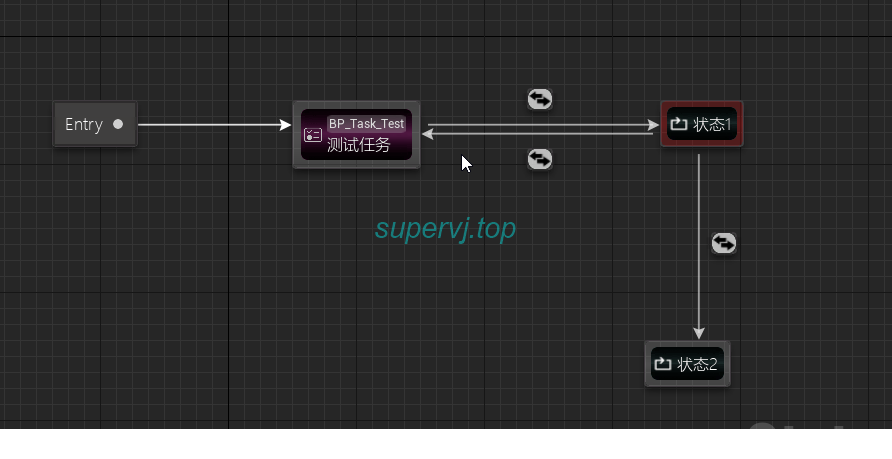
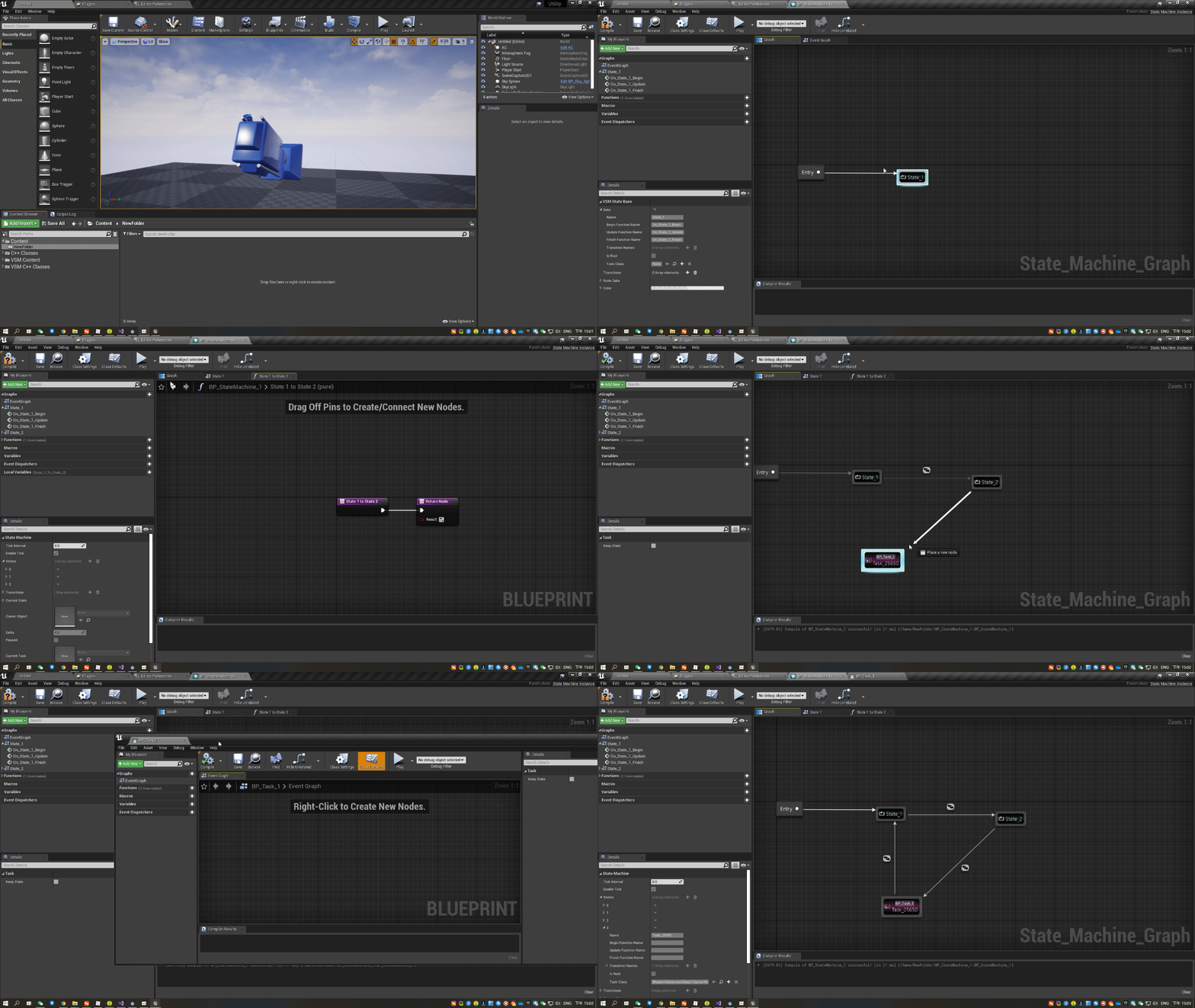
基础概念
自定义编辑器涉及到的类特别的多, 刚入手非常头疼, 我们先大概罗列一下需要用到的类及用途
-
UBlueprint: 编辑器界面的资源, 注意: 这个类不是被编辑和生成的对象
-
Instance类: 一般继承自UObject, 是UBlueprint的ParentClass, 这个是编辑器编辑的类和生成的对象
-
AssetEdtor: 资源编辑器,双击资源以后第一时间打开的界面的总管理者
-
ApplicationMode: 界面模式, 用于自定义布局和添加自定义界面, 在AssetEdtor中注册
-
AssetTypeAction: 定义创建资源的样式, 包括分类,颜色,对应的资源类和关键的
OpenAssetEditor()操作 -
Factory: 创建和托管资源, 定义了点击图标创建蓝图资源的过程
-
Graph :
Editor中的视图,比如蓝图中带网格的那种; 在Editor中创建和获取 -
Schema: 定义视图中的规则, 比如连线规则,创建Node规则等; 在
Graph创建的时候指定, 与Graph一般是组合出现 -
ActionMenu:
Slate类, 右键点击视图的菜单,用于选择节点 -
SchemaAction:
ActionMenu中的每一个功能节点, 用于创建Node等 -
Node: 视图中的蓝图节点, 表示的是一个函数或者状态机
- UEdGraphNode :
Node对象 - SGraphNode:
Slate类, 定义Node的显示样式
- UEdGraphNode :
-
GraphXXXXFactory: 实现节点/引脚/连线的创建的工厂类, 同时也定义了Node的对象与于此对应Slate类
-
Pin: Node之间连接的引脚
-
Connection Drawing Policy:
Pin之间连接的样式定义,包含颜色,线条样式等 -
INameValidatorInterface : 负责
Node重命名逻辑的类接口, 通过重写Node中的MakeNameValidator()方法指定重命名对象;如果要判断名字有效性和重复等就需要用到此类
创建资源
第一部, 我们需要创建资源, 这一步我们参考我之前的文章自定义资源, 如果需要自定义样式如图标/缩略图等, 请参考使用自定义Slate笔刷
AssetEditor
我们在打开资源的地方对Editor进行初始化
void FVSM_AssetTypeAction::OpenAssetEditor(const `TArray<UObject*>`& InObjects, `TSharedPtr<class IToolkitHost>` EditWithinLevelEditor /*= `TSharedPtr<IToolkitHost>`()*/)
{
	EToolkitMode::Type Mode = EditWithinLevelEditor.IsValid() ? EToolkitMode::WorldCentric : EToolkitMode::Standalone;

	for (auto ObjIt = InObjects.CreateConstIterator(); ObjIt; ++ObjIt)
	{
		auto Blueprint = `Cast<UBlueprint>`(*ObjIt);
		if (Blueprint && Blueprint->SkeletonGeneratedClass && Blueprint->GeneratedClass && Blueprint->`IsA<UVSM_Blueprint>`())
		{
			FVSMEditorModule& VSMEModule = FModuleManager::`LoadModuleChecked<FVSMEditorModule>`("VSMEditor");
			VSMEModule.CreateEditor(Mode,EditWithinLevelEditor,Blueprint);

		}
		else
		{
			FMessageDialog::Open(EAppMsgType::Ok, LOCTEXT("OpenStateMachineBlueprint Failed!!", "State machine Blueprint could not be loaded because it derives from an invalid class.\nCheck to make sure the parent class for this blueprint hasn't been removed!"));

		}
	}
}
`TSharedRef<FVSM_Editor>` FVSMEditorModule::CreateEditor(const EToolkitMode::Type Mode, const `TSharedPtr< class IToolkitHost >`& InitToolkitHost, UBlueprint* BP)
{

	CreateClassCache();//用于记录特定资源类
	`TSharedRef<FVSM_Editor>` editor(new FVSM_Editor());
	editor->InitEditor(Mode, InitToolkitHost, BP);
	return editor;
}
初始化的内容比较多, 重点就是如下几条, 其实可以模仿动画蓝图的初始化或者蓝图编辑器的初始化过程
    //创建自定义视图
if (!SMBP->Graph)
	{
		UVSM_Graph* StateMachineGraph = `CastChecked<UVSM_Graph>`(FBlueprintEditorUtils::CreateNewGraph(SMBP, NAME_None, UVSM_Graph::StaticClass(), UVSM_Schema::StaticClass()));
		if (StateMachineGraph)
			SMBP->Graph = StateMachineGraph;
	}
//初始化视图

GetGraph()->Init(SMBP, ThisPtr);

//创建工具栏

Toolbar = MakeShareable(new FVSM_Toolbar(ThisPtr));

//创建并设置模式
	AddApplicationMode(FVSM_AppMode_BlueprintEditor::ModeName, MakeShareable(new FVSM_AppMode_BlueprintEditor(ThisPtr, FVSM_AppMode_BlueprintEditor::ModeName)));
	SetCurrentMode(FVSM_AppMode_BlueprintEditor::ModeName);
我们这里用了自定义的细节面板, 就需要使用
Persona模块, 因为选中Node以后细节面板对应的信息我们需要自定义
FPersonaModule& PersonaModule = FModuleManager::`GetModuleChecked<FPersonaModule>`("Persona");
//这一步需要放到最后, 否则Inspector还没创建
PersonaModule.CustomizeBlueprintEditorDetails(Inspector->GetPropertyView().ToSharedRef(), FOnInvokeTab::CreateSP(this, &FAssetEditorToolkit::InvokeTab));
ApplicationMode
模式在Editor初始化的时候创建和添加
class FVSM_AppMode_BlueprintEditor : public FBlueprintEditorApplicationMode
我们直接继承自蓝图编辑器模式(没必要自己造轮子)
关键就俩函数, 构造函数和RegisterTabFactories()
构造函数需要传入Editor和模式名称
FVSM_AppMode_BlueprintEditor::FVSM_AppMode_BlueprintEditor(`TSharedPtr<class FVSM_Editor>` InStateMachineEditor, FName InModeName)
	: FBlueprintEditorApplicationMode(InStateMachineEditor, InModeName, FVSM_AppMode_BlueprintEditor::GetLocalizedMode, false, false)
{

	Editor = InStateMachineEditor;

	TabLayout = FTabManager::NewLayout("WidgetBlueprintEditor_Graph_Layout_v1")
		->AddArea
		(
			FTabManager::NewPrimaryArea()->SetOrientation(Orient_Vertical)
			->Split
			(
				FTabManager::NewStack()
				->SetSizeCoefficient(0.186721f)
				->SetHideTabWell(true)
				->AddTab(InStateMachineEditor->GetToolbarTabId(), ETabState::OpenedTab)
			)
			->Split
			(
				FTabManager::NewSplitter()->SetOrientation(Orient_Horizontal)
				->Split
				(
					FTabManager::NewSplitter()->SetOrientation(Orient_Vertical)
					->SetSizeCoefficient(0.15f)
					->Split
					(
						FTabManager::NewStack()->SetSizeCoefficient(0.5f)
						->AddTab(FBlueprintEditorTabs::MyBlueprintID, ETabState::OpenedTab)
					)
					->Split
					(
						FTabManager::NewStack()->SetSizeCoefficient(0.5f)
						->AddTab(FBlueprintEditorTabs::DetailsID, ETabState::OpenedTab)
					)
				)
				->Split
				(
					FTabManager::NewSplitter()->SetOrientation(Orient_Vertical)
					->SetSizeCoefficient(0.70f)
					->Split
					(
						FTabManager::NewStack()
						->SetSizeCoefficient(0.80f)

						->AddTab("Document", ETabState::ClosedTab)
						->AddTab(FVSM_Editor::TabId_GraphCanvas, ETabState::OpenedTab)
						->SetForegroundTab(FVSM_Editor::TabId_GraphCanvas)
					)
					->Split
					(
						FTabManager::NewStack()
						->SetSizeCoefficient(0.20f)
						->AddTab(FBlueprintEditorTabs::CompilerResultsID, ETabState::OpenedTab)
						->AddTab(FBlueprintEditorTabs::FindResultsID, ETabState::OpenedTab)
					)
				)
				->Split
				(
					FTabManager::NewSplitter()->SetOrientation(Orient_Vertical)
					->SetSizeCoefficient(0.15f)
					->Split
					(
						FTabManager::NewStack()
						->AddTab(FBlueprintEditorTabs::PaletteID, ETabState::ClosedTab)
					)
				)
			)
		);

	//InStateMachineEditor->GetToolbarBuilder()->AddWidgetBlueprintEditorModesToolbar(ToolbarExtender);
	if (UToolMenu* Toolbar = InStateMachineEditor->RegisterModeToolbarIfUnregistered(GetModeName()))
	{
		InStateMachineEditor->GetToolbarBuilder()->AddCompileToolbar(Toolbar);
		InStateMachineEditor->GetToolbarBuilder()->AddBlueprintGlobalOptionsToolbar(Toolbar);
		InStateMachineEditor->GetToolbarBuilder()->AddDebuggingToolbar(Toolbar);
		InStateMachineEditor->GetToolbarBuilder()->AddScriptingToolbar(Toolbar);
		InStateMachineEditor->GetToolbarBuilder()->AddNewToolbar(Toolbar);

	}


   }
void FVSM_AppMode_BlueprintEditor::RegisterTabFactories(`TSharedPtr<FTabManager>` InTabManager)
{
	`TSharedPtr<FVSM_Editor>` ed = GetEditor();

	 auto icon = FVSM_Style::GetBrush("VSM.StateMachineGraphSmall");
	WorkspaceMenuCategory = InTabManager->AddLocalWorkspaceMenuCategory(LOCTEXT("WorkspaceMenu_StateMachineEditor", "State Machine"));
	auto WorkspaceMenuCategoryRef = WorkspaceMenuCategory.ToSharedRef();
	InTabManager->RegisterTabSpawner(FVSM_Editor::TabId_GraphCanvas, FOnSpawnTab::CreateSP(ed.Get(), &FVSM_Editor::SpawnTab_GraphCanvas))
		.SetDisplayName(LOCTEXT("GraphCanvasTab", "State Machine Graph"))
		.SetGroup(WorkspaceMenuCategoryRef)
		//.SetIcon(FSlateIcon(FEditorStyle::GetStyleSetName(), "GraphEditor.EventGraph_16x"));
		.SetIcon(FSlateIcon(FVSM_Style::GetStyleSetName(), "VSM.StateMachineGraphSmall"));

	ed->RegisterToolbarTab(InTabManager.ToSharedRef());
	ed->PushTabFactories(CoreTabFactories);
	//如debug,details等所有常用标签
	ed->PushTabFactories(BlueprintEditorTabFactories);
	ed->PushTabFactories(TabFactories);
}
Graph
class VSMEDITOR_API UVSM_Graph : public UEdGraph
由Editor初始化, 主要负责Node的操作
如对与一般State节点
void UVSM_Graph::RegisterNode(UVSM_State_Base* State, UVSM_Node* NewNode, UEdGraphPin* FromPin)
{
	Modify();
	this->SMBP->Modify();
	//Register node to the nodes array
	this->SMBP->Nodes.Add(NewNode);
	State->GraphNode = NewNode;
	NewNode->State = State;
	NewNode->ReallocateDefaultPins();

	// Previous node
	if (FromPin)
	{
		UVSM_Node* FromNode = `Cast<UVSM_Node>`(FromPin->GetOwningNode());

		// apply current blueprint edited
		this->SetCurrentStateMachineBlueprintToNode(FromNode);


		if (FromNode->IsRootNode())
		{
			this->SetEntryState(State);
		}

	}
	if (!NewNode->IsRootNode())
	{
		NewNode->CreateBoundGraph();
	}
	this->SetCurrentStateMachineBlueprintToNode(NewNode);

	// linking between pins
	NewNode->AutowireNewNode(FromPin);

	NotifyGraphChanged();
}
Schema
class VSMEDITOR_API UVSM_Schema : public UEdGraphSchema
Schema一般分两种, 还有一种K2版本, 如果是一般蓝图中右键出现的菜单那种都是K2版本的, 能使用K2Node
//~ Begin EdGraphSchema Interface
	virtual void GetGraphContextActions(FGraphContextMenuBuilder& ContextMenuBuilder) const override;
	virtual void GetContextMenuActions(class UToolMenu* Menu, class UGraphNodeContextMenuContext* Context) const override;
	virtual const FPinConnectionResponse CanCreateConnection(const UEdGraphPin* PinA, const UEdGraphPin* PinB) const override;
	virtual bool TryCreateConnection(UEdGraphPin* PinA, UEdGraphPin* PinB) const override;
	virtual bool CreateAutomaticConversionNodeAndConnections(UEdGraphPin* PinA, UEdGraphPin* PinB) const override;
	virtual bool ShouldHidePinDefaultValue(UEdGraphPin* Pin) const override;
	virtual FLinearColor GetPinTypeColor(const FEdGraphPinType& PinType) const override;
	virtual void BreakNodeLinks(UEdGraphNode& TargetNode) const override;
	virtual void BreakPinLinks(UEdGraphPin& TargetPin, bool bSendsNodeNotifcation) const override;
	virtual void BreakSinglePinLink(UEdGraphPin* SourcePin, UEdGraphPin* TargetPin) const override;
	//~ End EdGraphSchema Interface
重写了很多方法, 从函数名称能看出来, 都是用来控制节点或者引脚之类的东西
重点说明几个函数
- GetContextMenuActions()
右键点击Node以后的操作, 比如这里我们只需要重命名和删除
void UVSM_Schema::GetContextMenuActions(class UToolMenu* Menu, class UGraphNodeContextMenuContext* Context) const
{
	if (Context->Pin)
	{
		FToolMenuSection& Section = Menu->AddSection("StateMachineGraphSchemaPinActions", LOCTEXT("PinActionsMenuHeader", "Actions"));

		Section.AddMenuEntry(FGenericCommands::Get().Delete);

		if (Context->Node->bCanRenameNode)
		{
			Section.AddMenuEntry(FGenericCommands::Get().Rename);
		}
	}

	Super::GetContextMenuActions(Menu, Context);
}
- GetGraphContextActions()
右键视图的操作, 我们需要讲自定义的Node添加到这里
void UVSM_Schema::GetGraphContextActions(FGraphContextMenuBuilder& ContextMenuBuilder) const
{
	`TSharedPtr<FVSM_SchemaAction_NewNode>` NewStateAction(new FVSM_SchemaAction_NewNode(
		LOCTEXT("DefaultCategory","Default"),
		LOCTEXT("NewState", "New State ..."),
		LOCTEXT("NewStateTooltip", "Add a new Default State"),
		0
	));
	ContextMenuBuilder.AddAction(NewStateAction);


	FCategorizedGraphActionListBuilder TasksBuilder(TEXT("Task"));
	FVSMEditorModule& EditorModule = FModuleManager::`GetModuleChecked<FVSMEditorModule>`(TEXT("VSMEditor"));
	FVSM_NodeClassHelper* ClassCache = EditorModule.GetClassCache().Get();
	`TArray<FVSM_NodeClassData>` NodeClasses;
	ClassCache->GatherClasses(false, UVSM_TaskInstance::StaticClass(), NodeClasses);
	for (const FVSM_NodeClassData& NodeClass : NodeClasses)
	{
		//auto data = NodeClass;
		const FText NodeTypeName = FText::FromString(FName::NameToDisplayString(NodeClass.ToString()+TEXT(" ..."), false));
		`TSharedPtr<FVSM_SchemaAction_NewTaskNode>` AddOpAction = UVSM_Schema::AddNewTaskNode(TasksBuilder, NodeClass.GetCategory(), NodeTypeName, FText::GetEmpty(), NodeClass);
	}
	ContextMenuBuilder.Append(TasksBuilder);
}
这里用到一个类FVSM_NodeClassHelper, 写法完全参考行为树的一个类似的Helper类(FGraphNodeClassHelper), 主要就是检索资源中的类用于创建自定义节点(参考行为树的Task)
我们可以完全复制其代码过来, 然后就会发现引擎会崩溃, 只需要在构造函数和析构函数中加入一些判断, 毕竟我们的模块不是引擎亲生的, 如
if (GEditor)
{
   GEditor->OnBlueprintCompiled().AddRaw(this, &FVSM_NodeClassHelper::InvalidateCache);
		GEditor->OnClassPackageLoadedOrUnloaded().AddRaw(this, &FVSM_NodeClassHelper::InvalidateCache);
}
在析构的时候对资源模块进行判断再引用, 否则在关闭编辑器后来个无聊的崩溃
	if (FModuleManager::Get().IsModuleLoaded(TEXT("AssetRegistry")))
	{
		FAssetRegistryModule& AssetRegistryModule = FModuleManager::`GetModuleChecked<FAssetRegistryModule>`(TEXT("AssetRegistry"));
		AssetRegistryModule.Get().OnFilesLoaded().RemoveAll(this);
		AssetRegistryModule.Get().OnAssetAdded().RemoveAll(this);
		AssetRegistryModule.Get().OnAssetRemoved().RemoveAll(this);
	}
其余基本抄袭
连接和绘制规则
需要定义一个FConnectionDrawingPolicy类,表述连接线的样式和连接规则等
ECanCreateConnectionResponse/ 节点连接规则
| ECanCreateConnectionResponse | 描述 |
|---|---|
| CONNECT_RESPONSE_MAKE | AB能随意连接(N:N) |
| CONNECT_RESPONSE_DISALLOW | AB不能连接(0:0) |
| CONNECT_RESPONSE_BREAK_OTHERS_A | A只能连接一次(1:N) |
| CONNECT_RESPONSE_BREAK_OTHERS_B | B只能连接一次(N:1) |
| CONNECT_RESPONSE_BREAK_OTHERS_AB | AB都只能连接一次(1:1) |
| CONNECT_RESPONSE_MAKE_WITH_CONVERSION_NODE | 通过中间强制转换节点或其他转换节点进行连接 |
GraphFactory
节点/引脚/连线的创建需要创建对应的工厂类来完成
class VSMEDITOR_API FVSM_GraphNodeFactory : public FGraphPanelNodeFactory
{
	virtual `TSharedPtr<class SGraphNode>` CreateNode(class UEdGraphNode* InNode) const override;
};

struct VSMEDITOR_API FVSM_PinConnectionFactory : public FGraphPanelPinConnectionFactory
{
public:
	virtual class FConnectionDrawingPolicy* CreateConnectionPolicy(const class UEdGraphSchema* Schema, int32 InBackLayerID, int32 InFrontLayerID, float ZoomFactor, const class FSlateRect& InClippingRect, class FSlateWindowElementList& InDrawElements, class UEdGraph* InGraphObj) const override;
};
class FConnectionDrawingPolicy* FVSM_PinConnectionFactory::CreateConnectionPolicy(const class UEdGraphSchema* Schema, int32 InBackLayerID, int32 InFrontLayerID, float ZoomFactor, const class FSlateRect& InClippingRect, class FSlateWindowElementList& InDrawElements, class UEdGraph* InGraphObj) const
{

	if (Schema->IsA(UVSM_Schema::StaticClass()))
		return new FVSM_ConnectionPolicy(InBackLayerID, InFrontLayerID, ZoomFactor, InClippingRect, InDrawElements, InGraphObj);

	return nullptr;
}

`TSharedPtr<class SGraphNode>` FVSM_GraphNodeFactory::CreateNode(class UEdGraphNode* InNode) const
{
	if (UVSM_Node_Entry* EntryNode = `Cast<UVSM_Node_Entry>`(InNode))
		return SNew(SVSM_Node_Entry, EntryNode);
	else if (UVSM_Node_Transition* TransitionNode = `Cast<UVSM_Node_Transition>`(InNode))
		return SNew(SVSM_Node_Transition, TransitionNode);
	else if (UVSM_Node_Task* TaskNode = `Cast<UVSM_Node_Task>`(InNode))
		return SNew(SVSM_Node_Task, TaskNode);
	else if (UVSM_Node* Node = `Cast<UVSM_Node>`(InNode))
		return SNew(SVSM_Node, Node);

	return nullptr;
}
然后在模块启动时注册到编辑器
void FVSMEditorModule::RegisterFactories()
{
	StateMachineGraphFactory = MakeShareable(new FVSM_GraphNodeFactory());
	StateMachineGraphPinConnectionFactory = MakeShareable(new FVSM_PinConnectionFactory());
	FEdGraphUtilities::RegisterVisualNodeFactory(StateMachineGraphFactory);
	FEdGraphUtilities::RegisterVisualPinConnectionFactory(StateMachineGraphPinConnectionFactory);
}

void FVSMEditorModule::UnregisterFactories()
{
	FEdGraphUtilities::UnregisterVisualNodeFactory(StateMachineGraphFactory);
	FEdGraphUtilities::UnregisterVisualPinConnectionFactory(StateMachineGraphPinConnectionFactory);
}
Node
节点继承自UEdGraphNode, 下列函数大多都是字面意思
	// UEdGraphNode interface.
	virtual void ReconstructNode() override;
	virtual	void AllocateDefaultPins() override;
	virtual bool CanCreateUnderSpecifiedSchema(const UEdGraphSchema* Schema) const override;
	virtual bool CanUserDeleteNode() const override{return true; };
	virtual void AutowireNewNode(UEdGraphPin* FromPin);
	virtual void DestroyNode() override;
	virtual void SaveNode();
	virtual void OnNotifyGraphChanged();
	virtual void OnPropertyUpdated(const FPropertyChangedEvent& PropertyChangedEvent, FProperty* PropertyThatChanged);
	virtual FLinearColor GetNodeTitleColor() const override;
	virtual FText GetNodeTitle(ENodeTitleType::Type TitleType) const override;
//重命名类
	virtual `TSharedPtr<class INameValidatorInterface>` MakeNameValidator() const override;
	virtual void OnRenameNode(const FString& NewName) override;
	// End of UEdGraphNode interface.

//三个函数跟双击以后的操作有关系, 比如跳转到某个视图或者打开某个资源
	virtual UObject* GetJumpTargetForDoubleClick() const override;
	virtual bool CanJumpToDefinition() const override;
	virtual void JumpToDefinition() const override;
Node与一个Runtime状态类(UVSM_State_Base*)同时存在, 选中Node以后, 细节面板显示的就是这个类,编辑的属性改的也是这个类,最终反馈到状态机类UVSM_StateMachine
SlateNode
每个Node都对应一个Slate类, 用于在视图中显示, 在GraphFactory中确定对应关系
class VSMEDITOR_API SVSM_Node : public SGraphNode
{

public:

	SLATE_BEGIN_ARGS(SVSM_Node) {}
	SLATE_END_ARGS()

	/************************************************************************/
	/* FUNCTIONS                                                            */
	/************************************************************************/

	void Construct(const FArguments& InArgs, UVSM_Node* InNode);

	// SGraphNode interface
	virtual void UpdateGraphNode() override;
	virtual void AddPin(const `TSharedRef<SGraphPin>`& PinToAdd) override;
	virtual void CreatePinWidgets() override;
	virtual const FSlateBrush* GetShadowBrush(bool bSelected) const override;
	void OnNameTextCommited(const FText& InText, ETextCommit::Type CommitInfo);
	bool OnVerifyNameTextChanged(const FText& InText, FText& OutErrorMessage);
	virtual void GetNodeInfoPopups(FNodeInfoContext* Context, `TArray<FGraphInformationPopupInfo>`& Popups) const override;
	// End of SGraphNode interface

	virtual FSlateColor GetNodeColor() const;
	virtual FSlateColor GetNodeBackgroundColor() const;
	virtual FText GetNodeTitle() const;
	FText GetPreviewCornerText() const;
	virtual const FSlateBrush* GetNameIcon() const;
	FSlateColor GetBorderBackgroundColor() const;


	 const  FVSM_SlateStyle* Style;

};
如果需要对debug的时候进行一些操作, 可以对一些函数进行改动, 比如如果要在Debug的时候提示一个信息框, 可以对GetNodeInfoPopups()函数进行如下操作
void SVSM_Node::GetNodeInfoPopups(FNodeInfoContext* Context, `TArray<FGraphInformationPopupInfo>`& Popups) const
{
	UVSM_Blueprint* StateMachineBlueprint = `Cast<UVSM_Blueprint>`(`Cast<UVSM_Graph>`(GraphNode->GetGraph())->SMBP);
	UVSM_Node* StateMachineGraphNode = `Cast<UVSM_Node>`(GraphNode);

	if (StateMachineGraphNode->IsRootNode() || !StateMachineGraphNode->State)
		return;

	if (StateMachineBlueprint)
	{
		if (UVSM_StateMachine* StateMachine = `Cast<UVSM_StateMachine>`(StateMachineBlueprint->GetObjectBeingDebugged()))
		{
			if (StateMachine->CurrentState.IsValid())
			{
				FString StateName = StateMachine->CurrentState.Name;
				if (StateName != StateMachineGraphNode->State->Data.Name)
					return;

				FLinearColor CurrentStateColor(1.f, 0.5f, 0.25f);
				FString StateText = FString::Printf(TEXT("%s ACTIVE"), *StateName);
				new (Popups) FGraphInformationPopupInfo(nullptr, CurrentStateColor, StateText);
			}
		}
	}
}
INameValidatorInterface
用于重命名的类, 通过重写Node的函数 virtual TSharedPtr MakeNameValidator() const override;指定对象
一般需要重写下面几个方法
	virtual EValidatorResult IsValid(const FString& Name, bool bOriginal) override;
	virtual EValidatorResult IsValid(const FName& Name, bool bOriginal) override;
	virtual bool IsCurrentName(const FName& Name) const;
	virtual bool IsExistingName(const FName& Name) const;
EValidatorResult FVSM_NameValidatorBase::IsValid(const FName & Name, bool bOriginal)
{
	if (Name.IsNone()) {
		return EValidatorResult::EmptyName;
	}
	if (!Name.IsValidXName()) {
		return EValidatorResult::ContainsInvalidCharacters;
	}
	if (IsCurrentName(Name)) {
		return EValidatorResult::ExistingName;
	}
	if (IsExistingName(Name)) {
		return EValidatorResult::AlreadyInUse;
	}
	return EValidatorResult::Ok;
}
外部通过调用IsValid()来获取返回类型, 重命名的时候决定是成功还是失败
Utilities
一个比较重要的静态库类, 定义了所有创建节点和视图操作
class VSMEDITOR_API FVSM_EditorUtilities
{

	/************************************************************************/
	/* FUNCTIONS                                                            */
	/************************************************************************/

public:

	template<typename T>
	static T* CreateNode(UEdGraph* Graph, int32 NodePosX, int32 NodePosY, bool bSelectNewNode = true)
	{
		`FGraphNodeCreator<T>` NodeCreator(*Graph);
		T* GraphNode = NodeCreator.CreateNode();
		GraphNode->NodePosX = NodePosX;
		GraphNode->NodePosY = NodePosY;
		NodeCreator.Finalize();

		return GraphNode;
	};
};


class VSMEDITOR_API FVSM_StateMachineUtilities : public FVSM_EditorUtilities
{

	/************************************************************************/
	/* PROPERTIES															*/
	/************************************************************************/

protected:
	static const FString PREFIX_NAME;
	static const FString BEGIN_NAME;
	static const FString UPDATE_NAME;
	static const FString FINISH_NAME;
	static const FString SUFFIX_BEGIN_NAME;
	static const FString SUFFIX_UPDATE_NAME;
	static const FString SUFFIX_FINISH_NAME;

public:

	/************************************************************************/
	/* FUNCTIONS                                                            */
	/************************************************************************/


	template<typename NodeType, typename StateType>
	static NodeType* AddNewDefaultState(int32 NodePosX, int32 NodePosY, UVSM_Graph* Graph, UEdGraphPin* FromPin = nullptr, bool bSelectNewNode = true)
	{
		NodeType* NewNode = `CreateNode<NodeType>`(Graph, NodePosX, NodePosY, bSelectNewNode);

		StateType* State = `NewObject<StateType>`(Graph->PrepareOuter());

		Graph->RegisterNode(State, NewNode, FromPin);

		return NewNode;
	};


	static UVSM_Node_Entry* AddNewEntry(int32 NodePosX, int32 NodePosY, UVSM_Graph* Graph, bool bSelectNewNode = true)
	{
		UVSM_Node_Entry* NewNode = `CreateNode<UVSM_Node_Entry>`(Graph, NodePosX, NodePosY, bSelectNewNode);

		UVSM_State_Entry* Entry = `NewObject<UVSM_State_Entry>`(Graph->PrepareOuter());
		Entry->Data.Name = TEXT("Entry");
		Graph->RegisterEntryNode(Entry, NewNode);

		return NewNode;
	};

	static UVSM_Node_Task* AddNewTask(int32 NodePosX, int32 NodePosY, UVSM_Graph* Graph, FVSM_NodeClassData InClassData, UEdGraphPin* FromPin = nullptr, bool bSelectNewNode = true)
	{

		UVSM_Node_Task* NewNode = `CreateNode<UVSM_Node_Task>`(Graph, NodePosX, NodePosY, bSelectNewNode);

		UVSM_State_Task* Task = `NewObject<UVSM_State_Task>`(Graph->PrepareOuter());
		Task->TaskBP = InClassData.GetBlueprint();
		Task->Data.TaskClass = InClassData.GetClass();
		Task->Data.Name = "Task_" + FString::FromInt(Task->GetUniqueID());
		UVSM_Blueprint* Blueprint = Graph->SMBP;
		Blueprint->GetSM()->AddOrUpdateState(Task->Data);
		Graph->RegisterTaskNode(Task, NewNode, FromPin);


		return NewNode;
	};


	template<typename NodeType, typename TransitionType>
	static NodeType* AddNewTransition(int32 NodePosX, int32 NodePosY, UVSM_Graph* Graph, bool bSelectNewNode = true)
	{
		NodeType* NewNode = `CreateNode<NodeType>`(Graph, NodePosX, NodePosY, bSelectNewNode);

		TransitionType* Transition = `NewObject<TransitionType>`(Graph->PrepareOuter());

		Graph->RegisterTransitionNode(Transition, NewNode);

		return NewNode;
	};


	static void AddDefaultStateGraph(UVSM_Graph* Graph, UVSM_Node* StateNode)
	{

		if (StateNode->IsRootNode()) return;


		UVSM_Blueprint* Blueprint = Graph->SMBP;
		UVSM_State_Base* SmState = StateNode->State;
		FVSM_StateData& State = SmState->Data;

		// 创建名称
		State.Name = "State_" + FString::FromInt(SmState->GetUniqueID());

		// 创建视图, 视图名称与状态名称相同
		SmState->StateGraph = FBlueprintEditorUtils::CreateNewGraph(Blueprint, *State.Name, UEdGraph::StaticClass(), UEdGraphSchema_K2::StaticClass());
		SmState->StateGraph->bAllowDeletion = false;
		SmState->StateGraph->bAllowRenaming = false;


		//添加新蓝图视图
		FBlueprintEditorUtils::AddUbergraphPage(Blueprint, SmState->StateGraph);

		State.BeginFunctionName = PREFIX_NAME + State.Name + SUFFIX_BEGIN_NAME;
		State.UpdateFunctionName = PREFIX_NAME + State.Name + SUFFIX_UPDATE_NAME;
		State.FinishFunctionName = PREFIX_NAME + State.Name + SUFFIX_FINISH_NAME;

		// 创建新事件节点
		UFunction* BeginFunction = `FindUField<UFunction>`(Blueprint->GetSM()->GetClass(), "BeginState_Internal");
		UK2Node_CustomEvent* BeginEvent = UK2Node_CustomEvent::CreateFromFunction(FVector2D(0, 0), SmState->StateGraph, State.BeginFunctionName, BeginFunction, false);
		BeginEvent->bCanRenameNode = false;


		UFunction* UpdateFunction = `FindUField<UFunction>`(Blueprint->GetSM()->GetClass(), "UpdateState_Internal");
		UK2Node_CustomEvent* UpdateEvent = UK2Node_CustomEvent::CreateFromFunction(FVector2D(0, 100.f), SmState->StateGraph, State.UpdateFunctionName, UpdateFunction, false);

		`TSharedPtr<FUserPinInfo>` PinDefinition = MakeShareable(new FUserPinInfo);
		FEdGraphPinType PinType;
		const UEdGraphSchema_K2* K2Schema = `GetDefault<UEdGraphSchema_K2>`();
		PinType.bIsReference = false;
		PinType.PinCategory = K2Schema->PC_Float;
		PinDefinition->PinName = "DeltaTime";
		PinDefinition->PinType = PinType;
		UEdGraphPin* NewPin = UpdateEvent->CreatePinFromUserDefinition(PinDefinition);
		UpdateEvent->ReconstructNode();
		UpdateEvent->bCanRenameNode = false;

		UFunction* FinishFunction = `FindUField<UFunction>`(Blueprint->GetSM()->GetClass(), "FinishState_Internal");
		UK2Node_CustomEvent* FinishEvent = UK2Node_CustomEvent::CreateFromFunction(FVector2D(0, 250.f), SmState->StateGraph, State.FinishFunctionName, FinishFunction, false);
		FinishEvent->bCanRenameNode = false;

		Blueprint->GetSM()->AddOrUpdateState(State);
	};

	static void AddNewTransitionGraph(UVSM_Graph* Graph, UVSM_Node_Transition* TransNode)
	{
		UVSM_Blueprint* Blueprint = Graph->SMBP;
		if ((!TransNode->GetInputPin() || TransNode->GetInputPin()->LinkedTo.Num() == 0)
			|| (!TransNode->GetOutputPin() && TransNode->GetOutputPin()->LinkedTo.Num() == 0))
			return;

		UVSM_Node* InputState = `CastChecked<UVSM_Node>`(TransNode->GetInputPin()->LinkedTo[0]->GetOwningNode());
		UVSM_Node* OutputState = `CastChecked<UVSM_Node>`(TransNode->GetOutputPin()->LinkedTo[0]->GetOwningNode());
		UVSM_State_Transition* Transition = TransNode->Transition;
		FVSM_TransitionData& RuntimeData = Transition->Data;

		if (InputState && OutputState)
		{
			// 创建过渡节点名称
			RuntimeData.Name = InputState->State->Data.Name + "_To_" + OutputState->State->Data.Name;
			RuntimeData.FromState = InputState->State->Data.Name;
			RuntimeData.ToState = OutputState->State->Data.Name;
			InputState->State->Data.TransitionNames.Add(RuntimeData.Name);
			// 创建函数视图,名字从RuntimeData获取
			Transition->TransitionGraph = FBlueprintEditorUtils::CreateNewGraph(Blueprint, *RuntimeData.Name, UEdGraph::StaticClass(), UEdGraphSchema_K2::StaticClass());
			Transition->TransitionGraph->bAllowDeletion = false;
			Transition->TransitionGraph->bAllowRenaming = false;
			FBlueprintEditorUtils::`AddFunctionGraph<UClass>`(Blueprint, Transition->TransitionGraph, true, nullptr);

			UK2Node_FunctionEntry* EntryNode = nullptr;
			if (Transition->TransitionGraph)
			{

				//获取所有输入节点
				`TArray<UK2Node_FunctionEntry*>` EntryNodes;
				Transition->TransitionGraph->GetNodesOfClass(EntryNodes);

				if ((EntryNodes.Num() > 0) && EntryNodes[0]->IsEditable())
					EntryNode = EntryNodes[0];

				// 创建返回节点
				if (EntryNode)
				{
					EntryNode->AddExtraFlags(FUNC_BlueprintPure);
					UK2Node_FunctionResult* ResultNode = FBlueprintEditorUtils::FindOrCreateFunctionResultNode(EntryNode);
					if (ResultNode)
					{

						const UEdGraphSchema_K2* K2Schema = `GetDefault<UEdGraphSchema_K2>`();

						FEdGraphPinType PinType;
						PinType.bIsReference = false;
						PinType.PinCategory = K2Schema->PC_Boolean;
						FName NewPinName = ResultNode->CreateUniquePinName(TEXT("Result"));
						UEdGraphPin* NewPin = ResultNode->CreateUserDefinedPin(NewPinName, PinType, EGPD_Input, false);

						ResultNode->ReconstructNode();
					}
				}
			}

			Blueprint->GetSM()->AddOrUpdateTransition(RuntimeData);
		}
	};


	static void RenameStateGraph(UVSM_State_Base* State, FString OldName, FString NewName)
	{
		if (State)
		{
			FVSM_StateData& RuntimeState = State->Data;
			RuntimeState.Name = NewName;
			if (State->StateGraph)
			{

				FBlueprintEditorUtils::RenameGraph(State->StateGraph, RuntimeState.Name);
				//重命名函数名称
				for (UEdGraphNode* Node : State->StateGraph->Nodes)
				{
					FString NodeName = Node->GetNodeTitle(ENodeTitleType::MenuTitle).ToString();
					if (NodeName == PREFIX_NAME + OldName + SUFFIX_BEGIN_NAME)
						Node->OnRenameNode(PREFIX_NAME + NewName + SUFFIX_BEGIN_NAME);
					else if (NodeName == PREFIX_NAME + OldName + SUFFIX_UPDATE_NAME)
						Node->OnRenameNode(PREFIX_NAME + NewName + SUFFIX_UPDATE_NAME);
					else if (NodeName == PREFIX_NAME + OldName + SUFFIX_FINISH_NAME)
						Node->OnRenameNode(PREFIX_NAME + NewName + SUFFIX_FINISH_NAME);
				}

				RuntimeState.BeginFunctionName = PREFIX_NAME + RuntimeState.Name + SUFFIX_BEGIN_NAME;
				RuntimeState.UpdateFunctionName = PREFIX_NAME + RuntimeState.Name + SUFFIX_UPDATE_NAME;
				RuntimeState.FinishFunctionName = PREFIX_NAME + RuntimeState.Name + SUFFIX_FINISH_NAME;
			}

			State->SMBP->GetSM()->AddOrUpdateState(RuntimeState, OldName);


		}
	};


	static void RenameStateGraph(UVSM_State_Transition* Transition)
	{
		if (Transition && Transition->TransitionGraph)
		{
			UVSM_Node_Transition* TransNode = `CastChecked<UVSM_Node_Transition>`(Transition->GraphNode);
			FVSM_TransitionData& RuntimeData = Transition->Data;


			if ((!TransNode->GetInputPin() || TransNode->GetInputPin()->LinkedTo.Num() == 0)
				|| (!TransNode->GetOutputPin() && TransNode->GetOutputPin()->LinkedTo.Num() == 0))
				return;

			UVSM_Node* InputState = `CastChecked<UVSM_Node>`(TransNode->GetInputPin()->LinkedTo[0]->GetOwningNode());
			UVSM_Node* OutputState = `CastChecked<UVSM_Node>`(TransNode->GetOutputPin()->LinkedTo[0]->GetOwningNode());

			FString OldName = Transition->TransitionGraph->GetName();

			RuntimeData.Name = InputState->State->Data.Name + "_To_" + OutputState->State->Data.Name;
			RuntimeData.FromState = InputState->State->Data.Name;
			RuntimeData.ToState = OutputState->State->Data.Name;

			FBlueprintEditorUtils::RenameGraph(Transition->TransitionGraph, RuntimeData.Name);
			Transition->SMBP->GetSM()->AddOrUpdateTransition(RuntimeData, OldName);
		}
	};

};