- Published on
- |- 次浏览
AI_MoveTo分析和扩展
- Authors

- Name
- 东哥
UK2Node_AIMoveTo
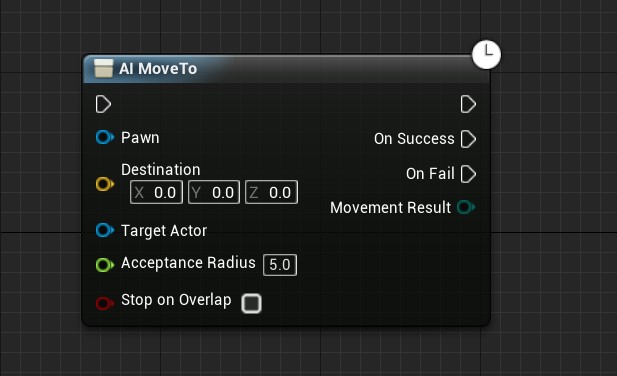
这是我们最熟悉的编辑器模式下的AI_MoveTo节点,也就是那个自带OnSuccess和OnFailed的异步节点,在蓝图中大多数时候使用起来都得心应手非常方便,但是它有个最大的缺点,异步节点意味着他有自己的生命周期,不能放到函数中使用,同样的,在代码中也没有此类节点,那么接下来我们尝试解决这一问题
翻看此节点的代码,没几行代码,主要看如下
UK2Node_AIMoveTo::UK2Node_AIMoveTo(const FObjectInitializer& ObjectInitializer)
	: Super(ObjectInitializer)
{
	ProxyFactoryFunctionName = GET_FUNCTION_NAME_CHECKED(UAIBlueprintHelperLibrary, CreateMoveToProxyObject);
	ProxyFactoryClass = UAIBlueprintHelperLibrary::StaticClass();
	ProxyClass = UAIAsyncTaskBlueprintProxy::StaticClass();
}
我们发现一个关键函数CreateMoveToProxyObject,找到该函数的原型
UAIBlueprintHelperLibrary::CreateMoveToProxyObject
static UAIAsyncTaskBlueprintProxy * CreateMoveToProxyObject
(
    UObject * WorldContextObject,
    APawn * Pawn,
    FVector Destination,
    AActor * TargetActor,
    float AcceptanceRadius,
    bool bStopOnOverlap
)
熟悉的参数,就是我们调用AIMoveTo的参数,继续翻代码
UAIBlueprintHelperLibrary::CreateMoveToProxyObject
UAIBlueprintHelperLibrary函数库的一个方法,返回UAIAsyncTaskBlueprintProxy对象
看关键代码
UAIAsyncTaskBlueprintProxy* MyObj = NULL;
这里需要注意一点,
UAIAsyncTaskBlueprintProxy构造以后会存到AISystem内,防止GC销毁
FAIMoveRequest MoveReq;
		MoveReq.SetUsePathfinding(true);
		MoveReq.SetAcceptanceRadius(AcceptanceRadius);
		MoveReq.SetReachTestIncludesAgentRadius(bStopOnOverlap);
		if (TargetActor)
		{
			MoveReq.SetGoalActor(TargetActor);
		}
		else
		{
			MoveReq.SetGoalLocation(Destination);
		}
		MoveReq.SetNavigationFilter(AIController->GetDefaultNavigationFilterClass());

		FPathFollowingRequestResult ResultData = AIController->MoveTo(MoveReq);
简单说就是,创建并设置了关键的结构体FAIMoveRequest,然后塞给AIController->MoveTo(MoveReq);至于AIController干了什么,我们后面再说
		FPathFollowingRequestResult ResultData = AIController->MoveTo(MoveReq);
		switch (ResultData.Code)
		{
		case EPathFollowingRequestResult::RequestSuccessful:
			MyObj->AIController = AIController;
			MyObj->AIController->ReceiveMoveCompleted.AddDynamic(MyObj, &UAIAsyncTaskBlueprintProxy::OnMoveCompleted);
			MyObj->MoveRequestId = ResultData.MoveId;
			break;

		case EPathFollowingRequestResult::AlreadyAtGoal:
			World->GetTimerManager().SetTimer(MyObj->TimerHandle_OnInstantFinish, MyObj, &UAIAsyncTaskBlueprintProxy::OnAtGoal, 0.1f, false);
			break;

		case EPathFollowingRequestResult::Failed:
		default:
			World->GetTimerManager().SetTimer(MyObj->TimerHandle_OnInstantFinish, MyObj, &UAIAsyncTaskBlueprintProxy::OnNoPath, 0.1f, false);
			break;
		}
Controller 的MoveTo方法返回一个结果结构体FPathFollowingRequestResult,这里用到结构体内的Code参数,看申明类型是TEnumAsByte<EPathFollowingRequestResult::Type> Code
看一下这个枚举
UENUM(BlueprintType)
namespace EPathFollowingRequestResult
{
	enum Type
	{
		Failed,
		AlreadyAtGoal,
		RequestSuccessful
	};
}
也就3个成员,分别是失败/已经到达/请求成功
- 对于3个结果分别绑定到本地3个函数
- 请求成功:监听AIController内的
ReceiveMoveCompleted,绑定到本地OnMoveCompleted,移动结果通过本地多播代理的OnFail或者OnSuccess广播 - 失败:0.1秒后执行本地
OnNoPath事件,广播OnFail,然后从AISystem移除 - 已经到达:0.1秒后执行本地事件
OnAtGoal,广播OnSuccess,然后从AISystem移除
- 请求成功:监听AIController内的
总结
创建一个代理类,通过
AIController执行移动事件,绑定了AIController的移动结果回调事件,把结果通过此代理的2个代理广播至于为什么用2个类型一样的代理,跟K2Node的使用有关系,理论上用1个代理可以实现一样的作用
封装蓝图方法
代理类
我们先来创建一个
UObject类,作为一个移动代理,毕竟移动有生命周期,必须要有个类来管理和监听
//.h
#pragma once

#include "CoreMinimal.h"
#include "UObject/NoExportTypes.h"
#include "Navigation/PathFollowingComponent.h"
#include "AIMoveProxy.generated.h"
DECLARE_DYNAMIC_DELEGATE_OneParam(FMoveEnd, EPathFollowingResult::Type, MovementResult);

class UAIAsyncTaskBlueprintProxy;
class APawn;
UCLASS(BlueprintType,Blueprintable)
class INPUTSYS_API UAIMoveProxy : public UObject
{
	GENERATED_BODY()

public:
	UPROPERTY(BlueprintReadWrite)
	UAIAsyncTaskBlueprintProxy* Proxy;

	UFUNCTION(BlueprintCallable)
		bool Proxy_AIMoveTo(APawn* Pawn,FVector Des,AActor* Target,const FMoveEnd& MoveResult,float AcceptanceRadius=5.0,bool StopOnOverlap=false);
	UFUNCTION()
		void MoveEnd(EPathFollowingResult::Type Result);

	UPROPERTY()
	FMoveEnd OnMoveEnd;
};
//.cpp


#include "AIMoveProxy.h"
#include "Blueprint/AIBlueprintHelperLibrary.h"
#include "Blueprint/AIAsyncTaskBlueprintProxy.h"

bool UAIMoveProxy::Proxy_AIMoveTo(APawn* Pawn, FVector Des, AActor* Target, const FMoveEnd& MoveResult, float AcceptanceRadius/*=5.0*/, bool StopOnOverlap/*=false*/)
{
	if (!Pawn)
	{
		return false;
	}
	OnMoveEnd = MoveResult;
	Proxy = UAIBlueprintHelperLibrary::CreateMoveToProxyObject(Pawn, Pawn, Des, Target, AcceptanceRadius, StopOnOverlap);
	Proxy->OnFail.AddDynamic(this,&UAIMoveProxy::MoveEnd);
	Proxy->OnSuccess.AddDynamic(this, &UAIMoveProxy::MoveEnd);


	return true;
}

void UAIMoveProxy::MoveEnd(EPathFollowingResult::Type Result)
{
	OnMoveEnd.ExecuteIfBound(Result);
}
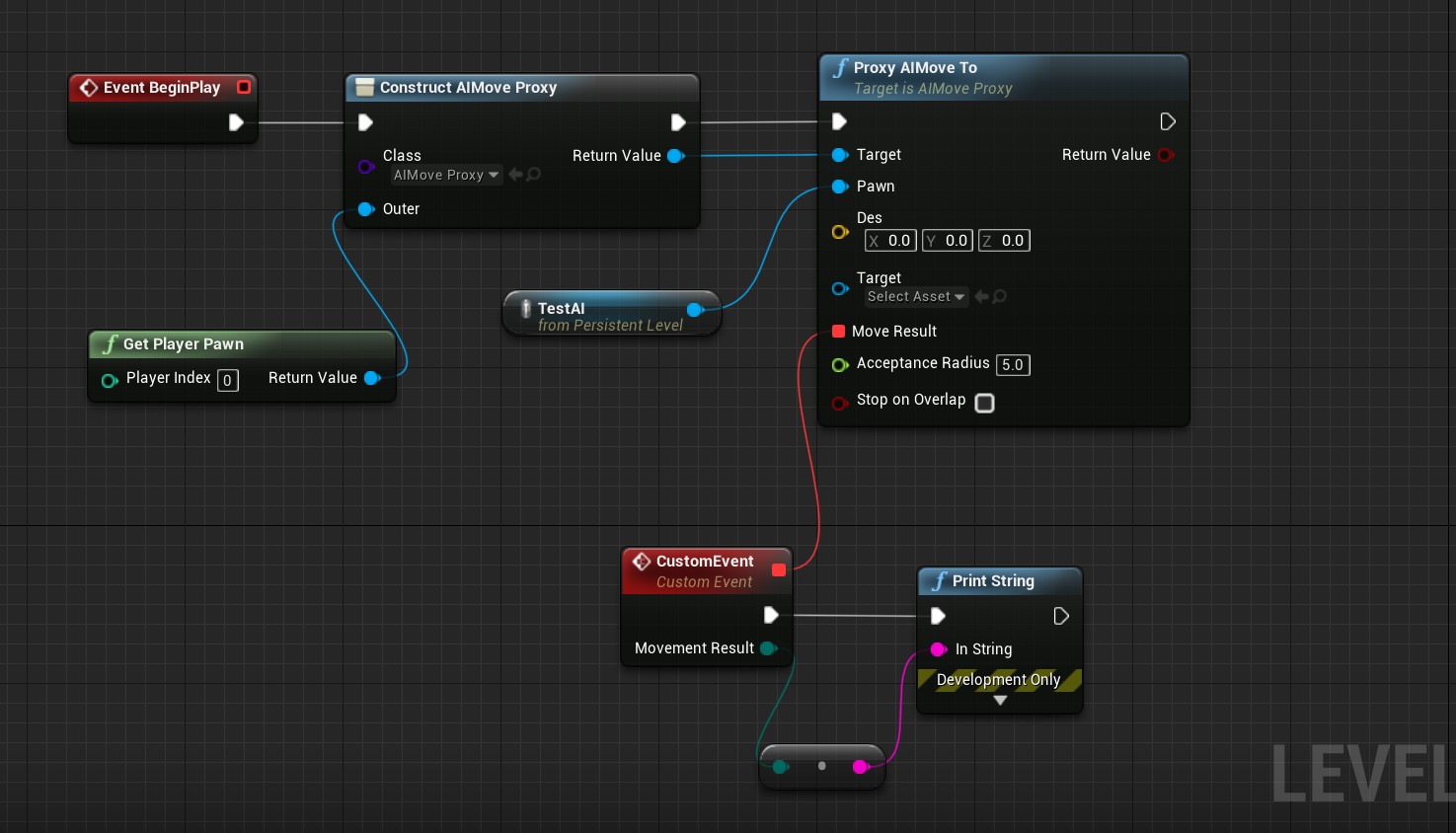
到蓝图实现如下图
函数库
但是这样还是不是很方便,每次都要手动创建一个类,于是就封装到了函数库里
//.h

#pragma once

#include "CoreMinimal.h"
#include "Kismet/BlueprintFunctionLibrary.h"
#include "AIMoveProxy.h"
#include "FLib_AI.generated.h"

/**
 *
 */
UCLASS(Blueprintable,BlueprintType)
class INPUTSYS_API UFLib_AI : public UBlueprintFunctionLibrary
{
	GENERATED_BODY()

public:
	UFUNCTION(BlueprintCallable)
	static UAIMoveProxy* V_AI_MoveTo(APawn* Pawn, FVector Des, AActor* Target, const FMoveEnd& MoveResult, float AcceptanceRadius = 5.0, bool StopOnOverlap = false);
};
//.cpp
#include "FLib_AI.h"

UAIMoveProxy* UFLib_AI::V_AI_MoveTo(APawn* Pawn, FVector Des, AActor* Target, const FMoveEnd& MoveResult, float AcceptanceRadius, bool StopOnOverlap)
{
	if (!Pawn) { return nullptr; };
	UAIMoveProxy* p = `NewObject<UAIMoveProxy>`(Pawn);
	p->Proxy_AIMoveTo(Pawn, Des, Target, MoveResult, AcceptanceRadius, StopOnOverlap);

	return p;
}
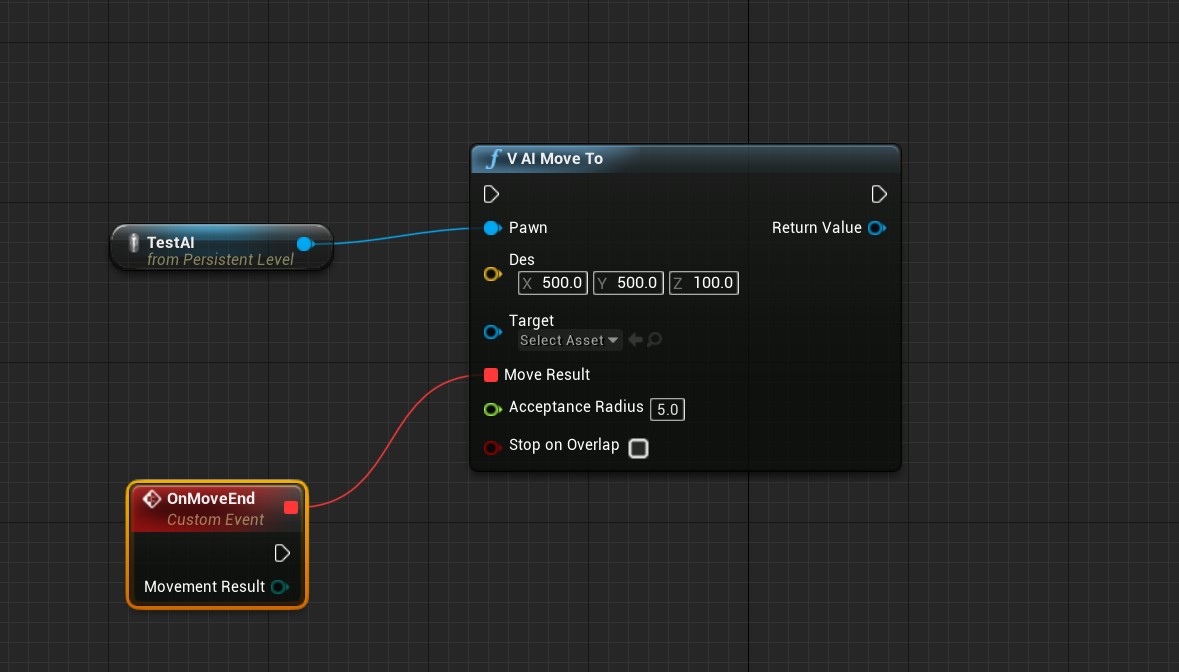
使用如下图
简单剖析一下
AIController
构造
PathFollowingComponent->OnRequestFinished.AddUObject(this, &AAIController::OnMoveCompleted);
绑定了UPathFollowingComponent的完成事件,我们上面代理监听的事件是从这里来的
MoveTo
先贴代码配注释
FPathFollowingRequestResult AAIController::MoveTo(const FAIMoveRequest& MoveRequest, FNavPathSharedPtr* OutPath)
{
	// MoveToActor和MoveToLocation都可以从蓝图/脚本中调用,并且应仅同时保留单个移动请求。
	// 此功能是所有运动机制的切入点-请勿在此处中止操作,因为运动可能由支持堆叠的AITasks处理

	SCOPE_CYCLE_COUNTER(STAT_MoveTo);
	UE_VLOG(this, LogAINavigation, Log, TEXT("MoveTo: %s"), *MoveRequest.ToString());

	FPathFollowingRequestResult ResultData;
	ResultData.Code = EPathFollowingRequestResult::Failed;

	if (MoveRequest.IsValid() == false)//判断请求是否有效,依据是有目标actor类或者不是移动到actor即坐标
	{
		UE_VLOG(this, LogAINavigation, Error, TEXT("MoveTo request failed due MoveRequest not being valid. Most probably desireg Goal Actor not longer exists"), *MoveRequest.ToString());
		return ResultData;
	}

	if (PathFollowingComponent == nullptr)//判断Path组件,默认就有挂载
	{
		UE_VLOG(this, LogAINavigation, Error, TEXT("MoveTo request failed due missing PathFollowingComponent"));
		return ResultData;
	}
//确保有寻路过滤器
	ensure(MoveRequest.GetNavigationFilter() || !DefaultNavigationFilterClass);

	bool bCanRequestMove = true;
	bool bAlreadyAtGoal = false;
    if (!MoveRequest.IsMoveToActorRequest())//移动到坐标点
	{
        //确保没有垃圾值,以及点在AI系统的最大边界值之内
		if (MoveRequest.GetGoalLocation().ContainsNaN() || FAISystem::IsValidLocation(MoveRequest.GetGoalLocation()) == false)
		{
			UE_VLOG(this, LogAINavigation, Error, TEXT("AAIController::MoveTo: Destination is not valid! Goal(%s)"), TEXT_AI_LOCATION(MoveRequest.GetGoalLocation()));
			bCanRequestMove = false;
		}

		//确保开启投射,这个参数在请求数据内可以通过set方法设置,默认开启
		if (bCanRequestMove && MoveRequest.IsProjectingGoal())
		{
            //得到寻路系统
			UNavigationSystemV1* NavSys = FNavigationSystem::`GetCurrent<UNavigationSystemV1>`(GetWorld());
            //得到寻路数据,保存于NavMovementComponent内
			const FNavAgentProperties& AgentProps = GetNavAgentPropertiesRef();
			FNavLocation ProjectedLocation;//寻路位置,存一个位置和一个数据元素(uint64)
			//确保投射成功,这里给了一个无效extent,在内部有做判断,使用默认寻路数据的extent
			if (NavSys && !NavSys->ProjectPointToNavigation(MoveRequest.GetGoalLocation(), ProjectedLocation, INVALID_NAVEXTENT, &AgentProps))
			{
				UE_VLOG_LOCATION(this, LogAINavigation, Error, MoveRequest.GetGoalLocation(), 30.f, FColor::Red, TEXT("AAIController::MoveTo failed to project destination location to navmesh"));
				bCanRequestMove = false;
			}
//刷新目标点为寻路点
			MoveRequest.UpdateGoalLocation(ProjectedLocation.Location);
		}
//判断是否到达,具体逻辑在UPathFollowingComponent内,稍复杂
		bAlreadyAtGoal = bCanRequestMove && PathFollowingComponent->HasReached(MoveRequest);
	}
    else
	{
		bAlreadyAtGoal = bCanRequestMove && PathFollowingComponent->HasReached(MoveRequest);
	}
//如果已经到达就设置结果参数
	if (bAlreadyAtGoal)
	{
		UE_VLOG(this, LogAINavigation, Log, TEXT("MoveTo: already at goal!"));
		ResultData.MoveId = PathFollowingComponent->RequestMoveWithImmediateFinish(EPathFollowingResult::Success);
		ResultData.Code = EPathFollowingRequestResult::AlreadyAtGoal;
	}
    //前面判断都过了,就得到建立寻路查询
	else if (bCanRequestMove)
	{
		FPathFindingQuery PFQuery;

		const bool bValidQuery = BuildPathfindingQuery(MoveRequest, PFQuery);
		if (bValidQuery)
		{
			FNavPathSharedPtr Path;
			FindPathForMoveRequest(MoveRequest, PFQuery, Path);
//RequestMove方法来提交移动的请求
			const FAIRequestID RequestID = Path.IsValid() ? RequestMove(MoveRequest, Path) : FAIRequestID::InvalidRequest;
			if (RequestID.IsValid())
			{
				bAllowStrafe = MoveRequest.CanStrafe();
				ResultData.MoveId = RequestID;
				ResultData.Code = EPathFollowingRequestResult::RequestSuccessful;

				if (OutPath)
				{
					*OutPath = Path;
				}
			}
		}
	}

	if (ResultData.Code == EPathFollowingRequestResult::Failed)
	{
		ResultData.MoveId = PathFollowingComponent->RequestMoveWithImmediateFinish(EPathFollowingResult::Invalid);
	}

	return ResultData;
上面的MoveTo完成了移动的请求即RequestMove,但是具体哪里在执行角色的移动呢,继续翻代码
RequestMove
FAIRequestID AAIController::RequestMove(const FAIMoveRequest& MoveRequest, FNavPathSharedPtr Path)
{
	uint32 RequestID = FAIRequestID::InvalidRequest;
	if (PathFollowingComponent)
	{
		RequestID = PathFollowingComponent->RequestMove(MoveRequest, Path);
	}

	return RequestID;
}
PathFollowingComponent
一顿操作以后调用UPathFollowingComponent::RequestMove
代码不贴全,茫茫多的判断以后来到关键的地方
			if (!bIsUsingMetaPath && Path.IsValid() && Path->IsValid())
			{
				Status = EPathFollowingStatus::Moving;

				// determine with path segment should be followed
				const uint32 CurrentSegment = DetermineStartingPathPoint(InPath.Get());
				SetMoveSegment(CurrentSegment);
			}
			else
			{
				Status = EPathFollowingStatus::Waiting;
				GetWorld()->GetTimerManager().SetTimer(WaitingForPathTimer, this, &UPathFollowingComponent::OnWaitingPathTimeout, WaitingTimeout);//等待以后结束寻路移动
			}
艰难通过前面几道判断(什么Idle,Paused等等我们先不管)以后,把状态参数Status改为Moving
然后呢?然后这个函数就结束了,继续翻,发现内容就在Tick里面
TickComponent
if (Status == EPathFollowingStatus::Moving)
	{
		// 判断是否结束以及刷新分段
		UpdatePathSegment();
	}

	if (Status == EPathFollowingStatus::Moving)
	{
		//这个是执行移动的地方
		FollowPathSegment(DeltaTime);
	}
很好奇,为什么同样一个if判断用2次?
继续翻FolowPathSegment
FolowPathSegment
完整代码
void UPathFollowingComponent::FollowPathSegment(float DeltaTime)
{
	if (!Path.IsValid() || MovementComp == nullptr)
	{
		return;
	}

	const FVector CurrentLocation = MovementComp->GetActorFeetLocation();
	const FVector CurrentTarget = GetCurrentTargetLocation();

	// set to false by default, we will set set this back to true if appropriate
	bIsDecelerating = false;

	const bool bAccelerationBased = MovementComp->UseAccelerationForPathFollowing();
	if (bAccelerationBased)
	{
		CurrentMoveInput = (CurrentTarget - CurrentLocation).GetSafeNormal();

		if (MoveSegmentStartIndex >= DecelerationSegmentIndex)
		{
			const FVector PathEnd = Path->GetEndLocation();
			const float DistToEndSq = FVector::DistSquared(CurrentLocation, PathEnd);
			const bool bShouldDecelerate = DistToEndSq < FMath::Square(CachedBrakingDistance);
			if (bShouldDecelerate)
			{
				bIsDecelerating = true;

				const float SpeedPct = FMath::Clamp(FMath::Sqrt(DistToEndSq) / CachedBrakingDistance, 0.0f, 1.0f);
				CurrentMoveInput *= SpeedPct;
			}
		}

		PostProcessMove.ExecuteIfBound(this, CurrentMoveInput);
		MovementComp->RequestPathMove(CurrentMoveInput);
	}
	else
	{
		FVector MoveVelocity = (CurrentTarget - CurrentLocation) / DeltaTime;

		const int32 LastSegmentStartIndex = Path->GetPathPoints().Num() - 2;
		const bool bNotFollowingLastSegment = (MoveSegmentStartIndex < LastSegmentStartIndex);

		PostProcessMove.ExecuteIfBound(this, MoveVelocity);
		MovementComp->RequestDirectMove(MoveVelocity, bNotFollowingLastSegment);
	}
}
主要就看2个函数MovementComp->RequestPathMove(CurrentMoveInput);和MovementComp->RequestDirectMove(MoveVelocity, bNotFollowingLastSegment);
- 前者点进去以后啥也没有,原因是基类不做实现,提示至少要从
PawnMovementComponent开始才有实现
看一下PawnMovementComponent 的实现
- 后者简单设置了一下
Velocity变量
OnPathFinished
计算寻路的时候各种判断,最后通过OnRequestFinished广播给监听者
小结
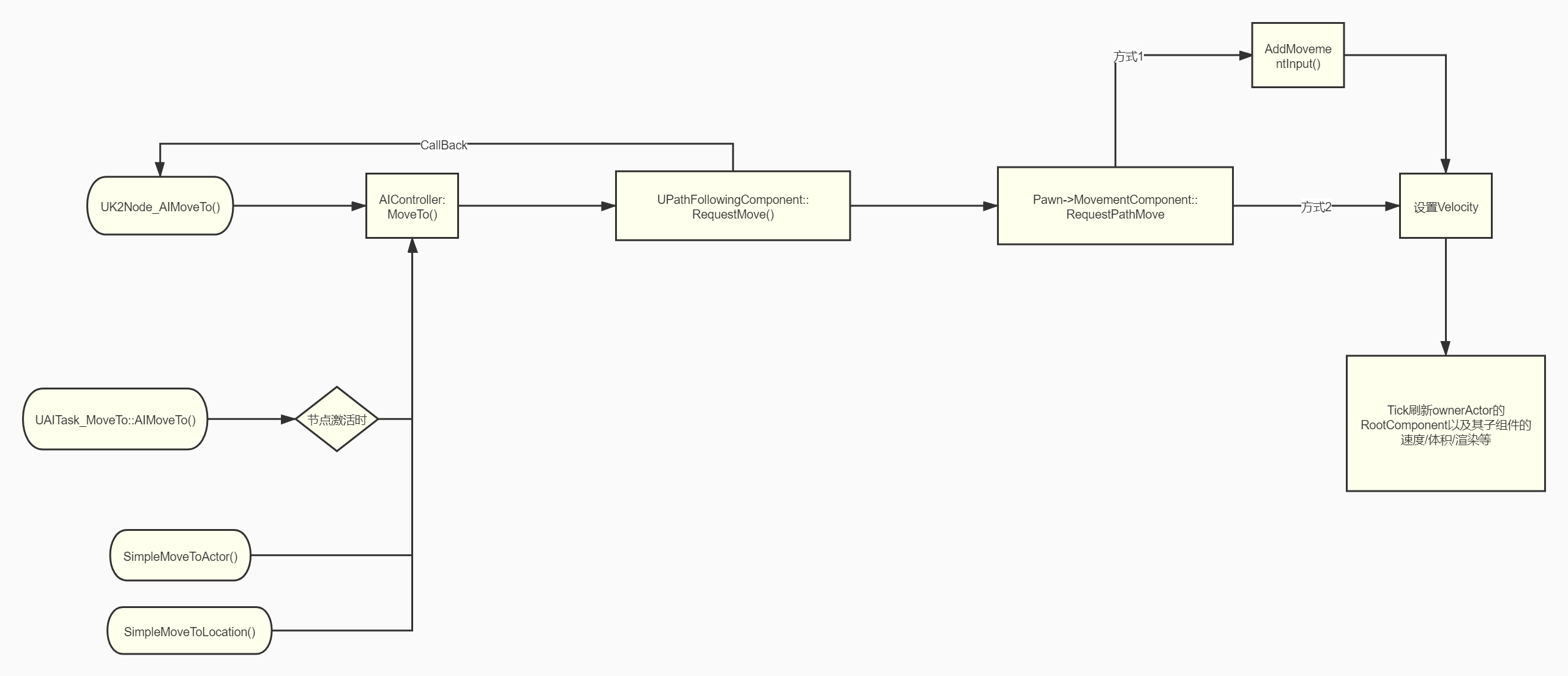
AI_MoveTo通过AIController调用UPathFollowingComponent的移动请求方法
在AIController的UPathFollowingComponent得到移动请求后,调用了Pawn内的移动组件的移动方法
PawnMovementComponent
void UPawnMovementComponent::RequestPathMove(const FVector& MoveInput)
{
	if (PawnOwner)
	{
		PawnOwner->Internal_AddMovementInput(MoveInput);
	}
}
绕了一大圈结果Pawn就是通过AddMovement执行路径移动,关于DirectMove在UPawnMovementComponent 中没有实现
继续看看UCharacterMovementComponent
UCharacterMovementComponent
主要执行移动的函数在PerformMovement里,此函数在TickComponent中调用
另外无意中发现了跟其他内容有关系的代码
if (MovementMode == MOVE_None || UpdatedComponent->Mobility != EComponentMobility::Movable || UpdatedComponent->IsSimulatingPhysics())
如果MovementMode设置了None 或者开启物理模拟了就不能移动
if (bHasRootMotionSources && !CharacterOwner->bClientUpdating && !CharacterOwner->bServerMoveIgnoreRootMotion)
		{
			if( CharacterOwner->IsPlayingRootMotion() && CharacterOwner->GetMesh() )
			{
RootMotion动画优先于移动
if (bHasAuthority && UNetDriver::IsAdaptiveNetUpdateFrequencyEnabled() && UpdatedComponent)
只对权威角色开启移动效果
主要通过MaybeUpdateBasedMovement或者MoveUpdatedComponent方法(在rootmotion情况下)等方法最后调用到方法MoveUpdatedComponentImpl,然后调用 UpdatedComponent->MoveComponent
另外
设置了当前的Velocity以及位置和旋转,也存储了Last和New2份
这个Velocity其实就是2帧渲染的位置插值
Pawn
AddMovement
//Pawn.h
void Internal_AddMovementInput(FVector WorldAccel, bool bForce = false);

//******************//
ControlInputVector += WorldAccel;
如果有UCharacterMovementComponent就调用组件里的方法(组件也是直接调用Pawn的内部方法)否则调用自身的内部方法Internal_AddMovementInput
同理用于Get方法
改变的这个参数用于派生类计算速度值Velocity用于,例如UFloatingPawnMovement::ApplyControlInputToVelocity
速度计算要通过USceneComponent
刷新位置顺序
用上面的速度变量来刷新位置信息
先看调用顺序,从移动组件的Tick开始
PerformMovement(DeltaTime)MovementComponent::MoveUpdatedComponentImpl(const FVector& Delta,...)UpdatedComponent(MovementComponent的parent的rootcomp)->MoveComponent()UpdatedComponent::MoveComponentImpl()UpdateComponentToWorld()UpdateComponentToWorldWithParent()PropagateTransformUpdate()
到这开始刷新根组件即parent的root的位置、渲染、体积、寻路等信息,同时也刷新子组件的信息,之后引擎的处理可以暂时参考由SetActorLocation分析渲染流程
其他移动方法
-
诸如
SimpleMoveToLocation等AIController内的方法最后都是调用了PathFollowingComponent::RequestMove -
AI行为的Task节点,最终调用的也是
AIController的MoveTo方法
总结
2020.12.31补充
玩家使用SimpleMoveTo的回调事件
AIMoveTo不能作用于玩家, 关键在于CreateMoveToProxyObject函数中的
AAIController* AIController = `Cast<AAIController>`(Pawn->GetController());
Simple版本可以作用给玩家, 例如Topdown模板内就用此来移动玩家, 但是Simple版本的2个函数没有回调事件, 如果想要得到回调事件如何做?
查看SimpleMoveToActor()
UPathFollowingComponent* PFollowComp = InitNavigationControl(*Controller);
UPathFollowingComponent* InitNavigationControl(AController& Controller)
	{
		AAIController* AsAIController = `Cast<AAIController>`(&Controller);
		UPathFollowingComponent* PathFollowingComp = nullptr;

		if (AsAIController)
		{
			PathFollowingComp = AsAIController->GetPathFollowingComponent();
		}
		else
		{
			PathFollowingComp = Controller.`FindComponentByClass<UPathFollowingComponent>`();
			if (PathFollowingComp == nullptr)
			{
				PathFollowingComp = `NewObject<UPathFollowingComponent>`(&Controller);
				PathFollowingComp->RegisterComponentWithWorld(Controller.GetWorld());
				PathFollowingComp->Initialize();
			}
		}

		return PathFollowingComp;
	}
上面代码看到如果不是AIController也可以, 所以我们玩家才可以使用Simple版本的移动
那么回调事件其实也在该组件内, 即我们需要一个PathFollowingComp
在我们的PlayerController内
ASRPlayerController::ASRPlayerController(const FObjectInitializer& ObjectInitializer) :Super(ObjectInitializer)
{
	PathFollowingComponent = `CreateDefaultSubobject<UPathFollowingComponent>`(TEXT("PathFollowingComponent"));
}
PathFollowingComponent->OnRequestFinished.AddUObject(this, &ASRPlayerController::MoveComplete);
void ASRPlayerController::MoveComplete(FAIRequestID RequestID, const FPathFollowingResult& Result)
{
	if (Result.IsSuccess())
	{
		ReceiveMoveComplete(true,CurrentMoveType);
	}
	else
	{
		ReceiveMoveComplete(false, CurrentMoveType);
	}
	CurrentMoveType = ESRMoveToType::None;
}

void ASRPlayerController::ReceiveMoveComplete_Implementation(bool bIsSuccess, ESRMoveToType MoveType)
{
	CurrentMoveType = ESRMoveToType::None;
}
然后蓝图就可以通过事件ReceiveMoveComplete_Implementation得到移动结束的消息, 当然有很多扩展方式, 你完全可以自己继承一个PathFollowingComp来做动态代理广播的方式
停止距离
问题来了, SimpleMoveToActor没有类似AIMoveTo的停止距离, 也不方便
扩展
	UFUNCTION(BlueprintCallable, Category = "SR|Lib|Movement")
		static void SimpleMoveToForAllController(AController* Controller, FVector Destination, AActor* Target, float AcceptanceRadius = 5.0f, bool StopOnOverlap= false);
void UFlib_SRUtilities::SimpleMoveToForAllController(AController* Controller, FVector Destination, AActor* Target, float AcceptanceRadius /*= 5.0f*/, bool StopOnOverlap/*= false*/)
{
	UNavigationSystemV1* NavSys = Controller ? FNavigationSystem::`GetCurrent<UNavigationSystemV1>`(Controller->GetWorld()) : nullptr;
	if (NavSys == nullptr || Controller == nullptr || Controller->GetPawn() == nullptr)
	{
		SRWARNING(TEXT("SimpleMoveToForAllController [no NavSys or Controller or pawn]"));
		return;
	}

	UPathFollowingComponent* PFollowComp = Controller->`FindComponentByClass<UPathFollowingComponent>`();

	if (PFollowComp == nullptr)
	{
		SRWARNING(TEXT("SimpleMoveToForAllController [no UPathFollowingComponent]"));
		return;
	}

	if (!PFollowComp->IsPathFollowingAllowed())
	{
		SRWARNING(TEXT("SimpleMoveToForAllController [not IsPathFollowingAllowed()]"));
		return;
	}

	bool bAlreadyAtGoal = false;
	if (Target)
	{
		bAlreadyAtGoal = PFollowComp->HasReached(*Target, EPathFollowingReachMode::OverlapAgentAndGoal);
	}
	else
	{
		bAlreadyAtGoal = PFollowComp->HasReached(Destination, EPathFollowingReachMode::OverlapAgentAndGoal);
	}


	if (PFollowComp->GetStatus() != EPathFollowingStatus::Idle)
	{
		PFollowComp->AbortMove(*NavSys, FPathFollowingResultFlags::ForcedScript | FPathFollowingResultFlags::NewRequest
			, FAIRequestID::AnyRequest, bAlreadyAtGoal ? EPathFollowingVelocityMode::Reset : EPathFollowingVelocityMode::Keep);
	}

	if (bAlreadyAtGoal)
	{
		PFollowComp->RequestMoveWithImmediateFinish(EPathFollowingResult::Success);
	}
	else
	{
		const FVector AgentNavLocation = Controller->GetNavAgentLocation();
		const ANavigationData* NavData = NavSys->GetNavDataForProps(Controller->GetNavAgentPropertiesRef(), AgentNavLocation);
		if (NavData)
		{

			FPathFindingQuery Query(Controller, *NavData, AgentNavLocation, Target?Target->GetActorLocation():Destination);
			FPathFindingResult Result = NavSys->FindPathSync(Query);

			if (Result.IsSuccessful())
			{
				Result.Path->SetGoalActorObservation(*Target, AcceptanceRadius);
				//这里不同于Simple版本的方式
				FAIMoveRequest MoveReq;
				MoveReq.SetUsePathfinding(true);
				MoveReq.SetAcceptanceRadius(AcceptanceRadius);
				MoveReq.SetReachTestIncludesAgentRadius(StopOnOverlap);
				if (Target)
				{
					MoveReq.SetGoalActor(Target);
				}
				else
				{
					MoveReq.SetGoalLocation(Destination);
				}

				PFollowComp->RequestMove(MoveReq, Result.Path);
			}
			else if (PFollowComp->GetStatus() != EPathFollowingStatus::Idle)
			{
				PFollowComp->RequestMoveWithImmediateFinish(EPathFollowingResult::Invalid);
			}

		}
	}
}