- Published on
- |- 次浏览
Google开源压缩库Draco
- Authors

- Name
- 东哥
前言
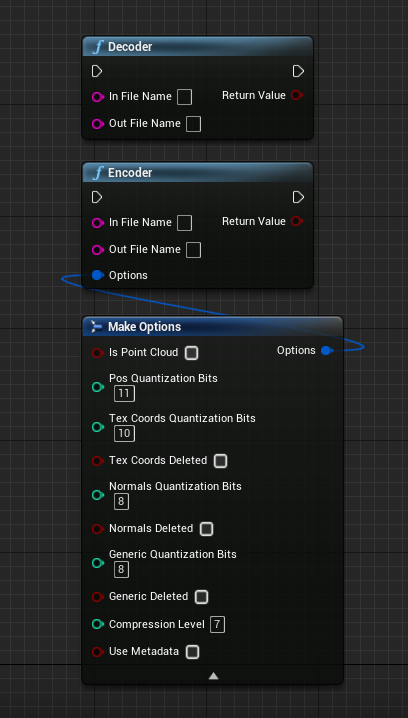
Draco是谷歌在2017年1月发布的一个3D图形开源压缩库,提供了多种算法进行压缩和解压缩。 对于encoder过程,Draco整体思路是将网格的连接信息和几何信息进行分别编码并进行存储。 其中,连接信息使用了edgebreaker等算法进行了编码压缩,几何信息对数据进行量化、预测压缩、熵编码。其中熵编码采用了rANS算法。 本文对Draco源码进行分析, 另外对其进行封装成UE插件
编译
- 下载源码, 地址GitHub
- CMake编译(可以用GUI默认编译即可),官方文档有详细说明
- draco.sln启动VS编译
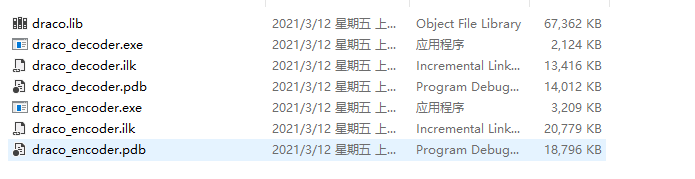
- Debug文件夹内即可以使用的
exe工具文件
使用工具
Draco支持模型文件后缀为obj和ply
拿模型文件source.obj做实例
./draco_encoder.exe -i 输入文件 -o 输出文件
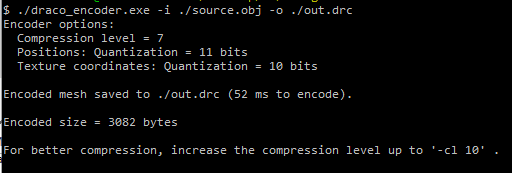
常用参数可以用
-qp #参数 (位置量化, 默认11)
-cl #参数  (压缩级别, 默认7)
反向操作可以把*.drc作为输入文件, 把*.obj作为输出文件即可
源码分析
压缩和反压缩的入口文件分别是draco_encoder.cc和draco_decoder.cc
我们已压缩做示例
//.........
if (options.pos_quantization_bits > 30) {
        printf(
            "Error: The maximum number of quantization bits for the position "
            "attribute is 30.\n");
        return -1;
      }
    } else if (!strcmp("-qt", argv[i]) && i < argc_check) {
      options.tex_coords_quantization_bits = StringToInt(argv[++i]);
      if (options.tex_coords_quantization_bits > 30) {
        printf(
            "Error: The maximum number of quantization bits for the texture "
            "coordinate attribute is 30.\n");
        return -1;
      }
    } else if (!strcmp("-qn", argv[i]) && i < argc_check) {
      options.normals_quantization_bits = StringToInt(argv[++i]);
      if (options.normals_quantization_bits > 30) {
        printf(
            "Error: The maximum number of quantization bits for the normal "
            "attribute is 30.\n");
        return -1;
      }
    } else if (!strcmp("-qg", argv[i]) && i < argc_check) {
      options.generic_quantization_bits = StringToInt(argv[++i]);
      if (options.generic_quantization_bits > 30) {
        printf(
            "Error: The maximum number of quantization bits for generic "
            "attributes is 30.\n");
        return -1;
      }
        //..............
开头部分拿到args参数以后判断几个可变参数,均是不能大于30
std::unique_ptr<draco::PointCloud> pc;
  draco::Mesh *mesh = nullptr;
  if (!options.is_point_cloud) {
    auto maybe_mesh =
        draco::ReadMeshFromFile(options.input, options.use_metadata);
    if (!maybe_mesh.ok()) {
      printf("Failed loading the input mesh: %s.\n",
             maybe_mesh.status().error_msg());
      return -1;
    }
    mesh = maybe_mesh.value().get();
    pc = std::move(maybe_mesh).value();
  } else {
    auto maybe_pc = draco::ReadPointCloudFromFile(options.input);
    if (!maybe_pc.ok()) {
      printf("Failed loading the input point cloud: %s.\n",
             maybe_pc.status().error_msg());
      return -1;
    }
    pc = std::move(maybe_pc).value();
  }
上面代码从文件获取draco::mesh变量, 封装UE插件在此处遇到了一个坑, 传送门
int ret = -1;
  const bool input_is_mesh = mesh && mesh->num_faces() > 0;
  if (input_is_mesh)
    ret = EncodeMeshToFile(*mesh, options.output, &encoder);
  else
    ret = EncodePointCloudToFile(*pc.get(), options.output, &encoder);

  if (ret != -1 && options.compression_level < 10) {
    printf(
        "For better compression, increase the compression level up to '-cl 10' "
        ".\n\n");
  }
后面就是写入到*.drc文件中, 实则是先写入到中间文件 draco::EncoderBuffer buffer中, 然后在通过
draco::WriteBufferToFile写入文件
封装UE插件
首先把Draco源码作为第三方库包含到插件内

声明一个结构体, 方便设置压缩参数
USTRUCT(BlueprintType)
struct FOptions
{
	GENERATED_BODY()
		FOptions() :is_point_cloud(false),
		pos_quantization_bits(11),
		tex_coords_quantization_bits(10),
		tex_coords_deleted(false),
		normals_quantization_bits(8),
		normals_deleted(false),
		generic_quantization_bits(8),
		generic_deleted(false),
		compression_level(7),
		use_metadata(false)
		{}


public:
	UPROPERTY(EditAnywhere, BlueprintReadWrite)
	bool is_point_cloud;
	UPROPERTY(EditAnywhere, BlueprintReadWrite)
	int pos_quantization_bits;
	UPROPERTY(EditAnywhere, BlueprintReadWrite)
	int tex_coords_quantization_bits;
	UPROPERTY(EditAnywhere, BlueprintReadWrite)
	bool tex_coords_deleted;
	UPROPERTY(EditAnywhere, BlueprintReadWrite)
	int normals_quantization_bits;
	UPROPERTY(EditAnywhere, BlueprintReadWrite)
	bool normals_deleted;
	UPROPERTY(EditAnywhere, BlueprintReadWrite)
	int generic_quantization_bits;
	UPROPERTY(EditAnywhere, BlueprintReadWrite)
	bool generic_deleted;
	UPROPERTY(EditAnywhere, BlueprintReadWrite)
	int compression_level;
	UPROPERTY(EditAnywhere, BlueprintReadWrite)
	bool use_metadata;


};
两个蓝图库函数
UFUNCTION(BlueprintCallable, Category = UnrealDraco)
		static bool EncoderFromFile(const FString& inFileName,  const FString& outFileName, FOptions options);
	UFUNCTION(BlueprintCallable, Category = UnrealDraco)
		static bool DecoderToFile(const FString& inFileName, const FString& outFileName);
逻辑部分基本是参考了源码main函数内的内容, 但是抄完发现无法从模型文件导入数据, 报错位置在
file_reader_factory.ccL41
std::unique_ptr<FileReaderInterface> FileReaderFactory::OpenReader(
    const std::string &file_name) {
  for (auto open_function : *GetFileReaderOpenFunctions()) {
    auto reader = open_function(file_name);
    if (reader == nullptr) {
      continue;
    }
    return reader;
  }
  FILEREADER_LOG_ERROR("No file reader able to open input"); //报错位置
  return nullptr;
}
因为这个open_function需要注册, 猜测默认没有注册, 于是就自定义一个类来完成这一步骤
//.h
class UD_FileReader : public FileReaderInterface {
 public:
  // Creates and returns a UD_FileReader that reads from |file_name|.
  // Returns nullptr when the file does not exist or cannot be read.
  static std::unique_ptr<FileReaderInterface> Open(
      const std::string &file_name);

  UD_FileReader() = delete;
  UD_FileReader(const UD_FileReader &) = delete;
  UD_FileReader &operator=(const UD_FileReader &) = delete;

  UD_FileReader(UD_FileReader &&) = default;
  UD_FileReader &operator=(UD_FileReader &&) = default;

  // Closes |file_|.
  ~UD_FileReader() override;

  // Reads the entire contents of the input file into |buffer| and returns true.
  bool ReadFileToBuffer(std::vector<char> *buffer) override;
  bool ReadFileToBuffer(std::vector<uint8_t> *buffer) override;

  // Returns the size of the file.
  size_t GetFileSize() override;

 private:
  UD_FileReader(FILE *file) : file_(file) {}

  FILE *file_ = nullptr;
  static bool registered_in_factory_;
};
//.cpp
std::unique_ptr<FileReaderInterface> UD_FileReader::Open(
    const std::string &file_name) {
  if (file_name.empty()) {
    return nullptr;
  }

  FILE *raw_file_ptr = fopen(file_name.c_str(), "rb");

  if (raw_file_ptr == nullptr) {
    return nullptr;
  }

  std::unique_ptr<FileReaderInterface> file(new (std::nothrow) UD_FileReader(raw_file_ptr));
  if (file == nullptr)
  {
	UDWARNING("Out of memory");
    fclose(raw_file_ptr);
    return nullptr;
  }

  return file;
}
bool UD_FileReader::ReadFileToBuffer(std::vector<char> *buffer) {
  if (buffer == nullptr)
  {
    return false;
  }
  buffer->clear();

  const size_t file_size = GetFileSize();
  if (file_size == 0) {
	UDWARNING("Unable to obtain file size or file empty");
    return false;
  }

  buffer->resize(file_size);
  return fread(buffer->data(), 1, file_size, file_) == file_size;
}

bool UD_FileReader::ReadFileToBuffer(std::vector<uint8_t> *buffer) {
  if (buffer == nullptr) {
    return false;
  }
  buffer->clear();

  const size_t file_size = GetFileSize();
  if (file_size == 0) {
  UDWARNING("Unable to obtain file size or file empty");
    return false;
  }

  buffer->resize(file_size);
  return fread(buffer->data(), 1, file_size, file_) == file_size;
}
核心代码就是上面的open()和ReadFileToBuffer()
然后在模块启动时注册
void FUnrealDracoModule::StartupModule()
{
	draco::FileReaderFactory::RegisterReader(draco::UD_FileReader::Open);
	draco::FileWriterFactory::RegisterWriter(draco::UD_FileWriter::Open);//写入版本,类似读取
}
这样就能正确从文件获取Mesh数据了
测试
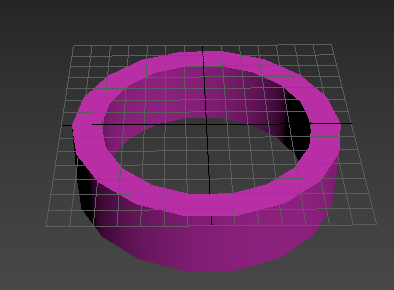
max随意创建一个模型, 导出为obj格式文件TT1.obj,随意放于目录C:\Users\Administrator\Desktop\1\内
执行如下节点
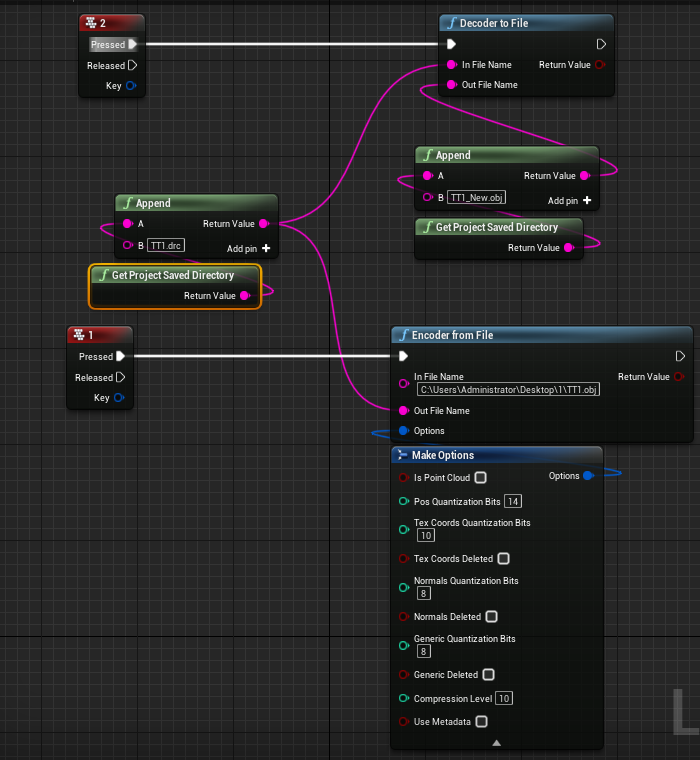
源文件大小25kb, 生成drc文件大小为 2kb, 反向解压出来文件TT1_New.obj放入max测试
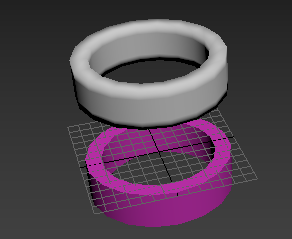
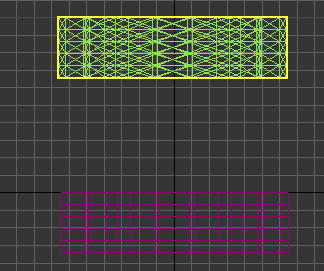
4边面变为3边面, 平滑组感觉有些许不同, 其余正常