- Published on
- |- 次浏览
DataTable优化方案
- Authors

- Name
- 东哥
前言

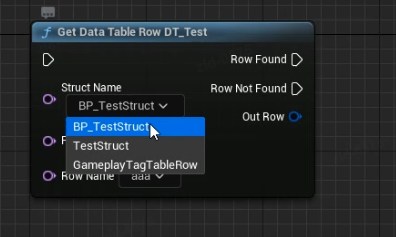
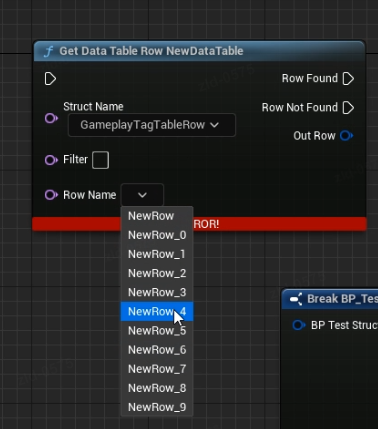
目标
- 自动加载
- 更简单的方式查询数据
- 需要支持cpp和蓝图
CPP
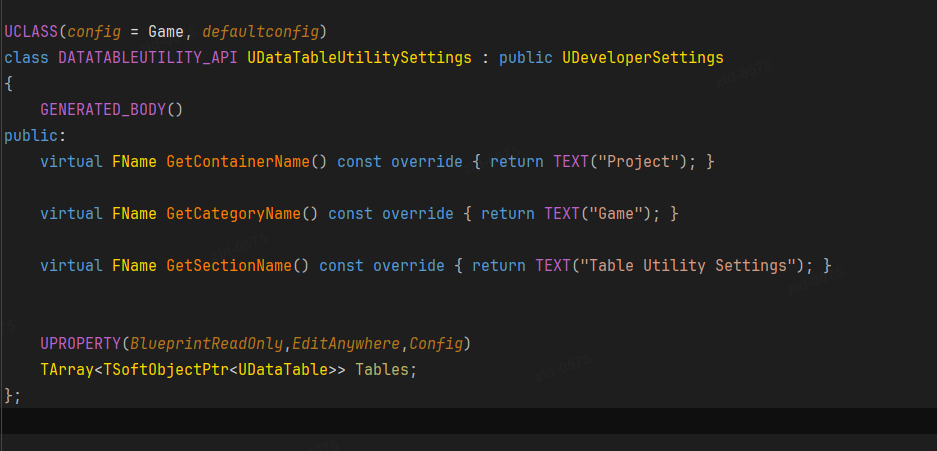
创建一个Setting类存储所有需要加载的表格
用一个引擎子系统加载和保存所有表格
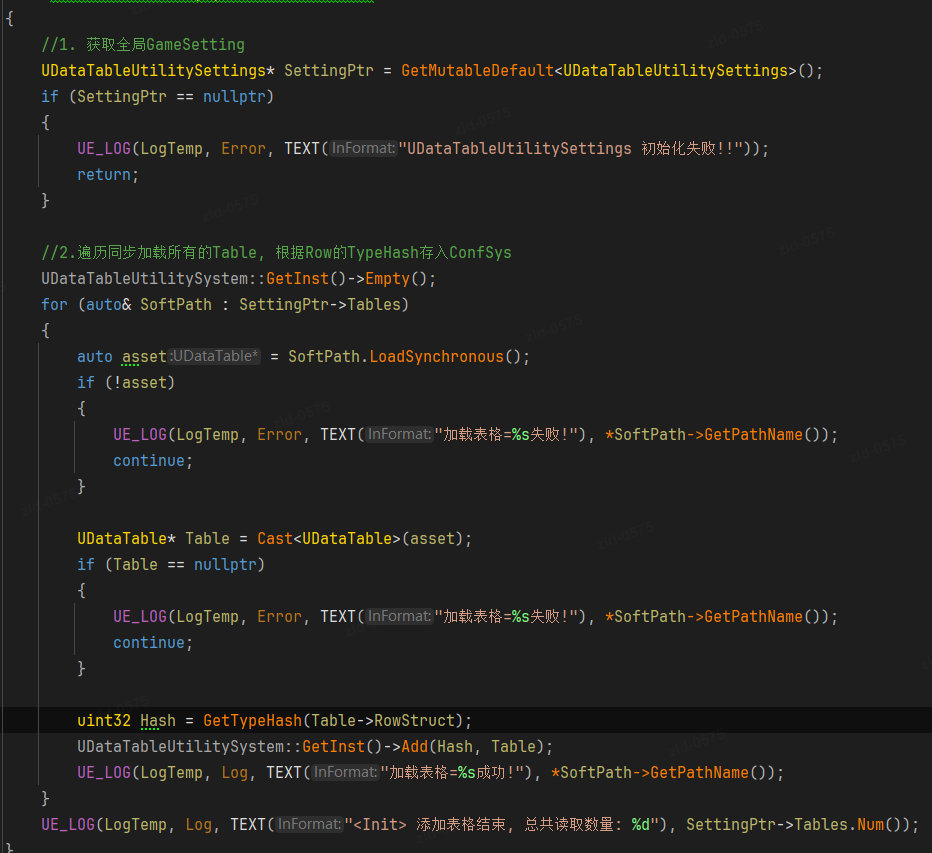
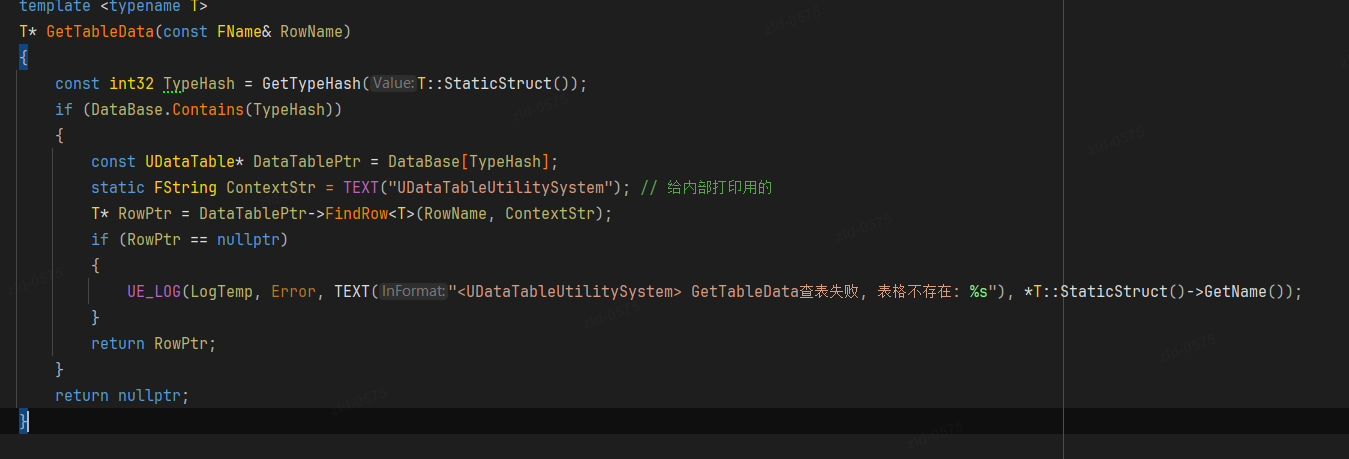
核心其实是用数据类型的哈希作为键来保存到Map中,这样就可以用模板的方式查询
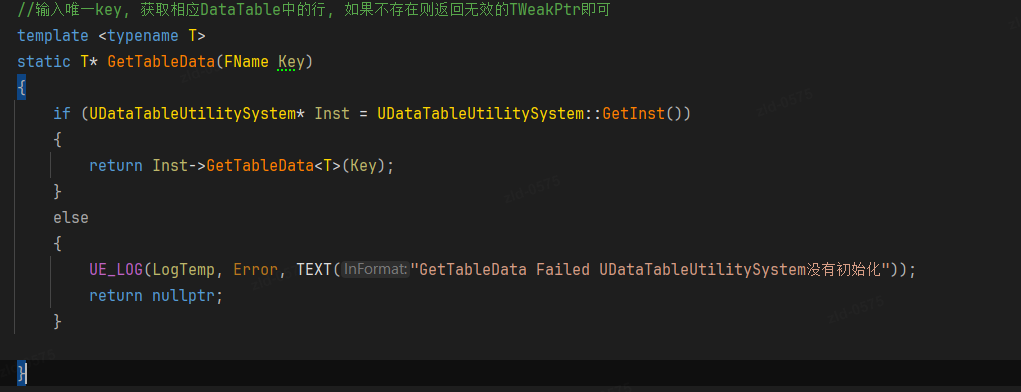
这里是包到了一个函数库中去,其实也可以直接放外面
蓝图
蓝图需要实现一个通过数据查询的方法麻烦很多
我们需要实现一个运行时的泛型函数,一个编辑器模式下的K2Node(类似GetDataTableRow),因为需要动态的修改数据类型和Row的Pin,所有还需要一个Factory来定义这两个Pin
蓝图函数
UFUNCTION(BlueprintCallable,CustomThunk,meta = (CustomStructureParam = "OutRow", BlueprintInternalUseOnly="true"))
	static  bool TryGetTableRowData(UPARAM(meta=(GetOptions = "GetAllTableStructs"))FName StructName,FName RowName, FTableRowBase& OutRow){return false;};

	static  bool Generic_TryGetTableRowData(FName StructName, FName RowName, void* OutRowPtr);
	DECLARE_FUNCTION(execTryGetTableRowData)
	{
		P_GET_PROPERTY(FNameProperty, StructName);
		P_GET_PROPERTY(FNameProperty, RowName);

		Stack.MostRecentProperty = nullptr;
		Stack.`StepCompiledIn<FStructProperty>`(NULL);
		void* OutRowPtr = Stack.MostRecentPropertyAddress;

		P_FINISH;

		bool bSuccess = false;

		FStructProperty* StructProp = `CastField<FStructProperty>`(Stack.MostRecentProperty);

		UDataTable* Table = UDataTableUtility::FindTableByStructName(StructName);
		if (!Table)
		{
			FBlueprintExceptionInfo ExceptionInfo(
				EBlueprintExceptionType::AccessViolation,
				NSLOCTEXT("TryGetTableRowData", "MissingStructInput", "Failed to resolve the table input. Be sure the DataTable is valid.")
			);
			FBlueprintCoreDelegates::ThrowScriptException(P_THIS, Stack, ExceptionInfo);
		}
		else if(StructProp && OutRowPtr)
		{
			UScriptStruct* OutputType = StructProp->Struct;
			const UScriptStruct* TableType  = Table->GetRowStruct();

			const bool bCompatible = (OutputType == TableType) ||
				(OutputType->IsChildOf(TableType) && FStructUtils::TheSameLayout(OutputType, TableType));
			if (bCompatible)
			{
				P_NATIVE_BEGIN;
				bSuccess = Generic_TryGetTableRowData(StructName, RowName, OutRowPtr);
				P_NATIVE_END;
			}
			else
			{
				FBlueprintExceptionInfo ExceptionInfo(
					EBlueprintExceptionType::AccessViolation,
					NSLOCTEXT("TryGetTableRowData", "IncompatibleProperty", "Incompatible output parameter; the data table's type is not the same as the return type.")
					);
				FBlueprintCoreDelegates::ThrowScriptException(P_THIS, Stack, ExceptionInfo);
			}
		}
		else
		{
			FBlueprintExceptionInfo ExceptionInfo(
				EBlueprintExceptionType::AccessViolation,
				NSLOCTEXT("TryGetTableRowData", "MissingOutputProperty", "Failed to resolve the output parameter for GetDataTableRow.")
			);
			FBlueprintCoreDelegates::ThrowScriptException(P_THIS, Stack, ExceptionInfo);
		}
		*(bool*)RESULT_PARAM = bSuccess;
	}
这个函数没有暴露给蓝图,即使暴露了也是不够的,因为数据结构是可以通过办法来制作下拉表,但是这个RowName没办法,所以只能靠K2Node
K2Node
可以先把K2Node_GetDataTableRow复制过来,因为区别就是他传递的是一个UObject,我们改成FName即可
,还需要一个工具函数通过Name去查询DataTable
UDataTable* UDataTableUtility::FindTableByStructName(FName Name)
{


	//删除所有空格
	FString StrName = Name.ToString();
	RemoveEmpty(StrName);
	if (auto Setting = `GetMutableDefault<UDataTableUtilitySettings>`())
	{
		for (auto& Table : Setting->Tables)
		{
			if (!Table || Table.Get()->GetRowStruct() == nullptr)
			{
				continue;
			}
			FString StructName = Table.Get()->GetRowStruct()->GetName();
			RemoveEmpty(StructName);
			// FString DisplayName = Table.Get()->GetRowStruct()->GetName().ToString();
			// RemoveEmpty(DisplayName);
			if (Table.IsValid() && StructName == StrName /*|| DisplayName == StrName)*/)
			{
				return Table.Get();
			}
		}
	}
	return nullptr;
}
Factory
这个对象的目的就是修改2个pin
`TSharedPtr<SGraphPin>` FDataTableUtilityPinFactory::CreatePin(UEdGraphPin* InPin) const
{
	if (InPin->PinType.PinCategory == UEdGraphSchema_K2::PC_Name )
	{
		UObject* Outer = InPin->GetOuter();
		const UEdGraphPin* DataTablePin = nullptr;
		if (Outer->IsA(UK2Node_GetTableData::StaticClass()))
		{
			//处理行号
			if (InPin->PinName == GetTableData::RowNamePinName)
			{
				const UK2Node_GetTableData* GetDataTableRowNode = `CastChecked<UK2Node_GetTableData>`(Outer);
				DataTablePin = GetDataTableRowNode->GetDataTablePin();
				auto FilterPin = GetDataTableRowNode->GetFilterPin();
				if (DataTablePin)
				{
					if (!DataTablePin->DefaultValue .IsEmpty() && DataTablePin->LinkedTo.Num() == 0)
					{
						if (auto DataTable = UDataTableUtility::FindTableByStructName(FName(DataTablePin->DefaultValue)))
						{
							`TArray<FName>` Names = DataTable->GetRowNames();
							if (FilterPin)
							{
								// Filter the names
								Names = Names.FilterByPredicate([FilterPin](FName Name)
								{
									return Name.ToString().Contains(FilterPin->DefaultValue);
								});
							}
							TArray<`TSharedPtr<FName>`> RowNames;
							for (auto Name:Names)
							{
								/** Create a simple array of the row names */
								`TSharedPtr<FName>` RowNameItem = MakeShareable(new FName(Name));
								RowNames.Add(RowNameItem);
							}
							return SNew(SGraphPinNameList, InPin, RowNames);
						}
					}
				}
			}
			else if (InPin->PinName == GetTableData::DataTablePinName)
			{
				const UK2Node_GetTableData* GetDataTableRowNode = `CastChecked<UK2Node_GetTableData>`(Outer);
				DataTablePin = GetDataTableRowNode->GetDataTablePin();
				if (DataTablePin)
				{
					auto Names = UDataTableUtility::GetAllTableStructs();

					TArray<`TSharedPtr<FName>`> RowNames;
					for (auto Name:Names)
					{
						/** Create a simple array of the row names */
						`TSharedPtr<FName>` RowNameItem = MakeShareable(new FName(Name));
						RowNames.Add(RowNameItem);
					}
					return SNew(SGraphPinNameList, InPin, RowNames);
				}
			}
		}
	}

	return nullptr;
}
因为加加一个名字筛选的Filter,不然遇到表格行数特别多的就炸了, 算是模拟一个搜索功能,有需要的话也可以加一个包含或者非包含2种条件