- Published on
- |- 次浏览
GameplayAbilitySystem入门与实战(一):初始化
- Authors

- Name
- 东哥
前言
引用官网的一段话介绍一下GAS系统
Gameplay技能系统 是一个高度灵活的框架,可用于构建你可能会在RPG或MOBA游戏中看到的技能和属性类型。你可以构建可供游戏中的角色使用的动作或被动技能,使这些动作导致各种属性累积或损耗的状态效果,实现约束这些动作使用的"冷却"计时器或资源消耗,更改技能等级及每个技能等级的技能效果,激活粒子或音效,等等。简单来说,此系统可帮助你在任何现代RPG或MOBA游戏中设计、实现及高效关联各种游戏中的技能,既包括跳跃等简单技能,也包括你喜欢的角色的复杂技能集。
此篇为
GameplayAbilitySystem入门文档的开篇,此系列文档会从零开始记录用UE4
GAS插件为基础, 尝试开发一个简单的ARPG游戏的案例
准备工作
- 创建C++工程
SuperRoad(也可以先创建蓝图工程,然后添加任意c++类), 目前引擎已经升级到4.26.0, 就以此版本为基础开发 - 暂不导入美术资源, 使用默认
TopDown模板的基础资源 - 打开引擎插件, 开启
GameplayAbilities并重启项目
打开项目Build.cs
暂添加如下模块
PrivateDependencyModuleNames.AddRange(new string[] {
            "GameplayAbilities",
            "GameplayTags",
            "GameplayTasks" });
初始化流程
GAS系统必须使用c++, 这个是目前逃不掉的规则, 后续可以考虑部分扩展成蓝图来更直观的连连看,
创建各种类
创建各种必要的基类和GAS相关类, 因为其中部分类初始化必须需要用到,下图仅供参考
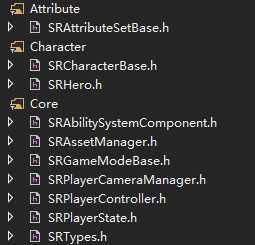
此项目多数类以SR为前缀
TargetData
首先为了使用TargetData必须找一个地方在尽量早的时机执行UAbilitySystemGlobals::InitGlobalData(),可以自定义一个SubsystemEngine或者如ActionRPG自定义一个AssetManager到这个类里面执行
ASC
ASC即AbilitySystemComponent, GAS系统的核心关键, 使用GAS的各类功能都是围绕这个组件展开的
一般流行的方法中关于ASC的创建会放到PlayerState(PS)或者Character/Pawn中,两种方式都可以,初始化略有区别, 但是都是围绕着一点 在客户端和服务端都在合适的时机调用初始化方法
这里有一点需要注意
如果
ASC在PS上,那么必须增加NetUpdateFrequency的值,因为默认情况下PS的优先级不高,会导致技能延迟
还有一个规则
如果组件的OwnerActor和作用目标不是同一个,那么必须实现IAbilitySystemInterface接口,同时必须重写里面的唯一的方法GetAbilitySystemComponent
UAbilitySystemComponent * ASRCharacterBase::GetAbilitySystemComponent() const
{
	return AbilitySystemComponent;
}
既然ASC需要在服务端和客户端都进行初始化,对于Pawn来说,可以在服务端用PossessedBy,在客户端用PlayerController的AcknowledgePawn初始化
void ASRCharacterBase::PossessedBy(AController * NewController)
{
	Super::PossessedBy(NewController);

	if (AbilitySystemComponent)
	{
		AbilitySystemComponent->InitAbilityActorInfo(this, this);
	}
	SetOwner(NewController);
}
void ASRPlayerControllerBase::AcknowledgePossession(APawn* P)
{
	Super::AcknowledgePossession(P);

	AVGCharacterBase* CharacterBase = `Cast<ASRCharacterBase>`(P);
	if (CharacterBase)
	{
		CharacterBase->GetAbilitySystemComponent()->InitAbilityActorInfo(CharacterBase, CharacterBase);
	}
}
对于ASC在PS中创建的,可以在客户端用Pawn的OnRep_PlayerState内初始化
// Server only
void AHeroCharacter::PossessedBy(AController * NewController)
{
	Super::PossessedBy(NewController);

	AGDPlayerState* PS = `GetPlayerState<AGDPlayerState>`();
	if (PS)
	{

		AbilitySystemComponent = `Cast<UGDAbilitySystemComponent>`(PS->GetAbilitySystemComponent());


		PS->GetAbilitySystemComponent()->InitAbilityActorInfo(PS, this);
	}

}
// Client only
void AHeroCharacter::OnRep_PlayerState()
{
	Super::OnRep_PlayerState();

	AGDPlayerState* PS = `GetPlayerState<AGDPlayerState>`();
	if (PS)
	{
		AbilitySystemComponent = `Cast<UGDAbilitySystemComponent>`(PS->GetAbilitySystemComponent());
		AbilitySystemComponent->InitAbilityActorInfo(PS, this);
	}

}
因为考虑怪物也需要释放技能, 那么我就干脆直接把
ASC创建到基础角色中,即SRCharacterBase中
ASRCharacterBase::ASRCharacterBase(const FObjectInitializer& ObjectInitializer):Super(ObjectInitializer)
{
	PrimaryActorTick.bCanEverTick = true;
	AbilitySystemComponent = `CreateDefaultSubobject<USRAbilitySystemComponent>`(TEXT("AbilityComponent"));
	AbilitySystemComponent->SetIsReplicated(true);
	AbilitySystemComponent->SetReplicationMode(EGameplayEffectReplicationMode::Mixed);

	AttributeSet = `CreateDefaultSubobject<USRAttributeSetBase>`(TEXT("AttributeSet"));

}
然后就按照之前所说的, 在PossessedBy和Controller中的AcknowledgePossession中初始化ASC
添加技能/初始化属性
因为我们需要使用技能, 而技能必须被添加到ASC中, 可以理解为注册技能, 我们这里给SRCharacterBase加入几个初始化方法;
也别忘了给角色添加几个变量来设置初始内容
	//角色技能
	UPROPERTY(BlueprintReadOnly, EditAnywhere, Category = "SR | Abilities")
		TArray<`TSubclassOf<class USRGameplayAbilityBase>`> CharacterAbilities;

	//初始效果,用来初始化属性
	UPROPERTY(BlueprintReadOnly, EditAnywhere, Category = "SR | Abilities")
		`TSubclassOf<class UGameplayEffect>` DefaultAttributeEffect;

	//初始应用的GE效果,例如魔法回复
	UPROPERTY(BlueprintReadOnly, EditAnywhere, Category = "SR | Abilities")
		TArray<`TSubclassOf<class UGameplayEffect>`> StartupEffects;
	//初始化属性
	virtual void InitAttributes();
	//添加初始技能
	virtual void AddCharacterStartupAbilities();
	//添加初始效果
	virtual void AddStartUpEffects();
分别实现
void ASRCharacterBase::InitAttributes()
{
	if (!AbilitySystemComponent)
	{
		UE_LOG(SRLog, Warning, TEXT("InitAttributes failed [no ASC]  !!"));
		return;
	}
	if (!DefaultAttributeEffect)
	{
		UE_LOG(SRLog, Warning, TEXT("InitAttributes failed [no DefaultAttributeEffect]  !!"));
		return;
	}

	FGameplayEffectContextHandle EffectContextHandle = AbilitySystemComponent->MakeEffectContext();
	EffectContextHandle.AddSourceObject(this);

	FGameplayEffectSpecHandle SpecHandle = AbilitySystemComponent->MakeOutgoingSpec(DefaultAttributeEffect, GetCharacterLevel(), EffectContextHandle);
	if (SpecHandle.IsValid())
	{
		FActiveGameplayEffectHandle ActiveGEHandle = AbilitySystemComponent->ApplyGameplayEffectSpecToTarget(*SpecHandle.Data.Get(), AbilitySystemComponent);
	}
}
void ASRCharacterBase::AddCharacterStartupAbilities()
{
	if (GetLocalRole() != ROLE_Authority || !AbilitySystemComponent || AbilitySystemComponent->bHasGiveCharacterAbilities)
	{
		return;
	}
	for (auto ga : CharacterAbilities)
	{

		FGameplayAbilitySpec spec = FGameplayAbilitySpec(ga, GetAbilityLevel(ga.GetDefaultObject()->AbilityName), static_cast<int32>(ga.GetDefaultObject()->InputID), this);
		AbilitySystemComponent->GiveAbility(spec);

	}
	AbilitySystemComponent->bHasGiveCharacterAbilities = true;
}
void ASRCharacterBase::AddStartUpEffects()
{
	if (GetLocalRole() != ROLE_Authority || !AbilitySystemComponent || AbilitySystemComponent->bHasApplyStartupEffects)
	{
		UE_LOG(SRLog, Warning, TEXT("Add Startup Effects failed"));
		return;
	}

	FGameplayEffectContextHandle EffectContextHandle = AbilitySystemComponent->MakeEffectContext();
	EffectContextHandle.AddSourceObject(this);
	for (auto ge : StartupEffects)
	{
		FGameplayEffectSpecHandle SpecHandle = AbilitySystemComponent->MakeOutgoingSpec(ge, GetCharacterLevel(), EffectContextHandle);
		if (SpecHandle.IsValid())
		{
			FActiveGameplayEffectHandle ActiveGEHandle = AbilitySystemComponent->ApplyGameplayEffectSpecToTarget(*SpecHandle.Data.Get(), AbilitySystemComponent);
		}
	}
	AbilitySystemComponent->bHasApplyStartupEffects = true;
}
上面初始化属性实际上也是激活了一次GameplayAbilityEffect效果, 这个关于GA和GE之类的内容在后续展开
我们现在随意创建一个GA和一个GE
为了防止重复调用, 上述代码中会有两个bool变量(bHasApplyStartupEffects,bHasGiveCharacterAbilities)需要稍微注意, 当然不是必须的
关于调用时机, 我们把他们放在了服务端的函数 PossessedBy中,关于客户端是否需要调用后续看需求跟进.
此函数目前状态
void ASRCharacterBase::PossessedBy(AController* NewController)
{
	Super::PossessedBy(NewController);
	if (AbilitySystemComponent)
	{
		AbilitySystemComponent->InitAbilityActorInfo(this, this);
	}
	InitAttributes();
	AddCharacterStartupAbilities();
	AddStartUpEffects();
}
按键绑定
ASC有一个非常快捷的按键绑定方式,即调用方法BindAbilityActivationToInputComponent(...)
传入参数第二个参数FGameplayAbilityInputBinds非常有意思,先看一下构造函数
FGameplayAbilityInputBinds(FString InConfirmTargetCommand, FString InCancelTargetCommand, FString InEnumName, int32 InConfirmTargetInputID = INDEX_NONE, int32 InCancelTargetInputID = INDEX_NONE)
		: ConfirmTargetCommand(InConfirmTargetCommand)
		, CancelTargetCommand(InCancelTargetCommand)
		, EnumName(InEnumName)
		, ConfirmTargetInputID(InConfirmTargetInputID)
		, CancelTargetInputID(InCancelTargetInputID)
	{ }
- InEnumName
我们先看这个参数, 他需要你定义一个枚举变量, 此枚举成员变量的名字就需要对应到游戏项目设置里的 Input栏内的Action名称,当然有两个例外,后面讲, 先定义一个枚举
UENUM(BlueprintType)
enum class ESRAbilityInputID : uint8
{
	NONE,
	CONFIRM,
	CANCEL,
	ABILITY1,
	ABILITY2,
	ABILITY3,
	ABILITY4,
	ABILITY5,
	ABILITY6,
	ABILITY7,
	ABILITY8,
	ABILITY9,
	ABILITY10,
};
- InConfirmTargetCommand/InCancelTargetCommand
这俩参数是确认和取消命令的Action名称, 即你打开你游戏项目设置里的 Input栏内的Action名称
如果输入为空,就使用之前枚举里定义的两个对应的枚举名称;如果设置了其他名称, 那么你Action内的这俩功能的名称可以改成你设置的;
- ConfirmTargetInputID/CancelTargetInputID
这俩是具体枚举里面的对应确认和取消命令的成员变量
最后实现如下
void ASRHero::BindASCInput()
{
	if (!bHasBindInput && AbilitySystemComponent && InputComponent)
	{
		AbilitySystemComponent->BindAbilityActivationToInputComponent(InputComponent, FGameplayAbilityInputBinds(TEXT("CONFIRM"), TEXT("CANCEL"),
			TEXT("ESRAbilityInputID"), static_cast<int32>(ESRAbilityInputID::CONFIRM), static_cast<int32>(ESRAbilityInputID::CANCEL)));
		bHasBindInput = true; //防止多次绑定
	}
}
实测发现, 自定义的
Confirm和Cancel会调用到ASC的虚函数virtual void LocalInputConfirm(); 和 virtual void LocalInputCancel();而并不能成功调用已经注册的例如
InputID=CF的技能当然理论上可以绕一圈重写上面方法来调用到对应技能
所以建议还是
BindAbilityActivationToInputComponent的前两个参数设置成对应的Confirm和Cancel的名称或者直接设置成空也是可以映射到枚举的
然后就是函数执行时机问题,这里有个问题需要考虑, 你调用此函数的时候需要确保或者尽量保证InputComponent已经存在了,服务端没什么问题, 在服务端在SetupPlayerInputComponent中执行绑定函数;
关键就是客户端, 客户端通过PlayerController::ClientRestart()函数然后创建的InputComponent,我们重写了OnRep_PlayerState来执行客户端事件, 也调用绑定事件, 因为有bool变量来防止多次绑定, 那么此举也是为了保险起见(GASDoc项目是这么建议的)
自定义GA类
上面添加技能的方法中有一条语句是我们自定义的GA类的内容
FGameplayAbilitySpec spec = FGameplayAbilitySpec(ga, GetAbilityLevel(ga.GetDefaultObject()->AbilityName), static_cast<int32>(ga.GetDefaultObject()->InputID), this);
		AbilitySystemComponent->GiveAbility(spec);
这里有两个参数InputID和AbilityName;
我们创建USRGameplayAbilityBase 继承自 UGameplayAbility
新建如下变量
	UPROPERTY(BlueprintReadOnly, EditAnywhere, Category = "Ability")
		FString AbilityName;
	UPROPERTY(BlueprintReadOnly, EditAnywhere, Category = "Ability")
		ESRAbilityInputID InputID = ESRAbilityInputID::NONE;
	UPROPERTY(BlueprintReadOnly, EditAnywhere, Category = "Ability")
		bool bAutoActivate = false;
重写方法OnAvatarSet
void USRGameplayAbilityBase::OnAvatarSet(const FGameplayAbilityActorInfo* ActorInfo, const FGameplayAbilitySpec& Spec)
{
	Super::OnAvatarSet(ActorInfo, Spec);
	if (bAutoActivate)
	{
		ActorInfo->AbilitySystemComponent->TryActivateAbility(Spec.Handle, false);
	}
}
目的是如果是自动释放的技能就直接释放;
至此我们技能的与按键就对应起来了
测试
测试之前我们创建几个测试性的GA和GE, 这里我已经把初始化属性也做了, 但这是后续内容, 这里不展开; 我们先测试能否正确触发技能
创建GA_Test,内容如下
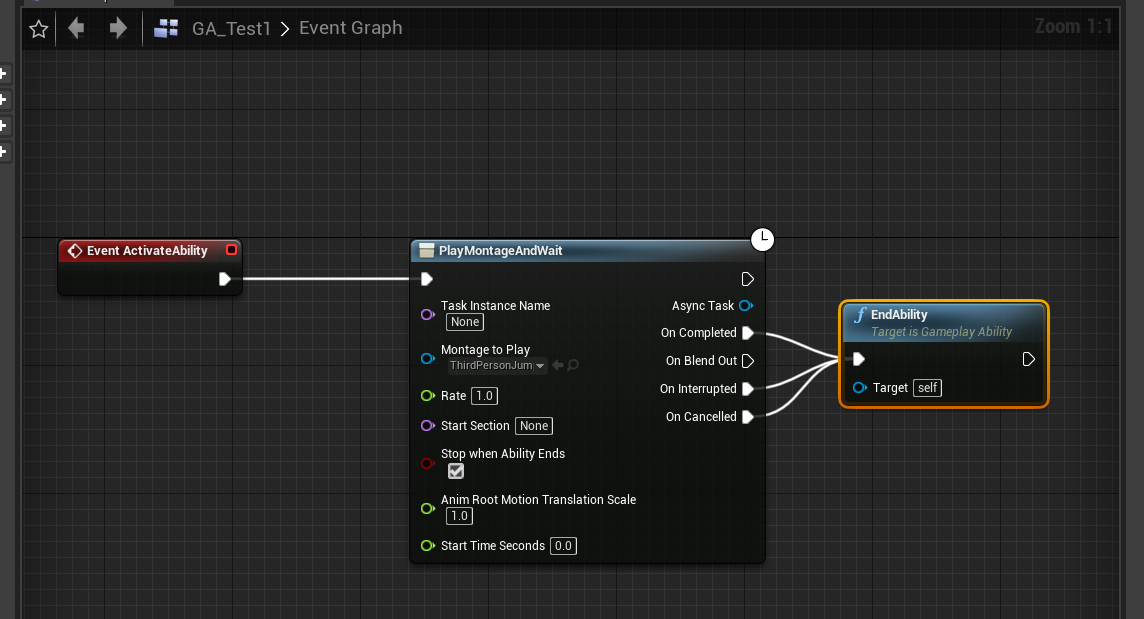
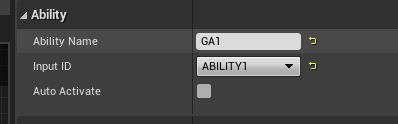
蒙太奇动画是一个跳跃动作(别忘记给默认动画蓝图加一个插槽),然后配置按键
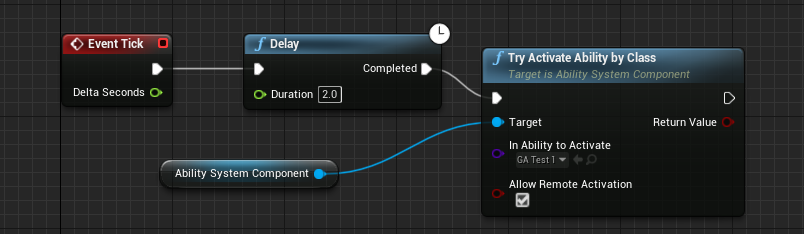
丢一个AI怪通过如下方式一直释放技能
然后开测
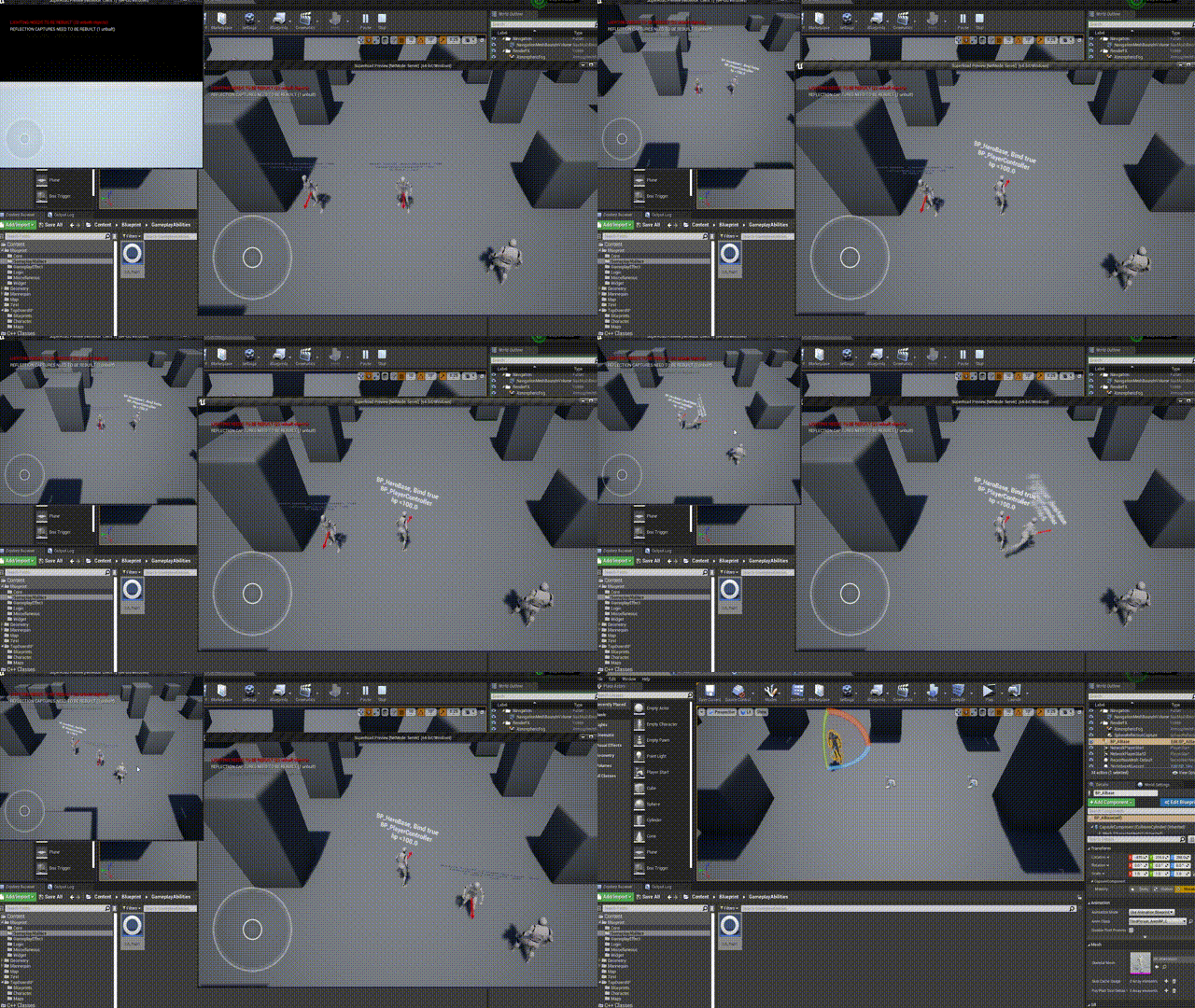
完成!!!