- Published on
- |- 次浏览
GameplayAbilitySystem入门与实战(四):GameplayAbility(一)
- Authors

- Name
- 东哥
前言
在第一篇初始化的时候简单讲解了技能的添加和使用, 但是没有对技能GameplayAbility(GA)做详细介绍,本片开始对GA中的主要功能注意剖析
注册/移除技能
之前我们通过配置的方式自动注册起始技能, 那么我们肯定需要动态的增加或者删除技能, 为了方便使用, 封装蓝图库
UFUNCTION(BlueprintCallable, Server, Reliable, WithValidation, Category = "SR|ASC")
		void RPC_Ser_AddAbility(`TSubclassOf<USRGameplayAbilityBase>` AbilityClass, int32 level = 1);
	UFUNCTION(BlueprintCallable, Server, Reliable, WithValidation, Category = "SR|ASC")
		void RPC_Ser_RemoveAbilityByClass(`TSubclassOf<USRGameplayAbilityBase>` AbilityClass);
	UFUNCTION(BlueprintCallable, Server, Reliable, WithValidation, Category = "SR|ASC")
		void RPC_Ser_RemoveAbilityByName(const FString& name);

//以下3个非RPC事件
	UFUNCTION(BlueprintCallable, Category = "SR|ASC")
		bool AddNewAbility(`TSubclassOf<USRGameplayAbilityBase>` AbilityClass, int32 level = 1);
	UFUNCTION(BlueprintCallable, Category = "SR|ASC")
		bool RemoveAbilityByClass(`TSubclassOf<USRGameplayAbilityBase>` AbilityClass);
	UFUNCTION(BlueprintCallable, Category = "SR|ASC")
		bool RemoveAbilityByName(const FString& name);
bool USRAbilitySystemComponent::AddNewAbility(`TSubclassOf<USRGameplayAbilityBase>` AbilityClass, int32 level)
{
	if (AbilitySpecMap.Num()>0)
	{
		for (TPair<FString, FGameplayAbilitySpec*> p : AbilitySpecMap)
		{
			if (p.Value->Ability->GetClass() == AbilityClass)
			{
				UE_LOG(SRLog, Warning, TEXT("USRAbilitySystemComponent::AddNewAbility Failed!! Has Repeat Ability"));
				return false;
			}
		}
	}
	FGameplayAbilitySpec spec = FGameplayAbilitySpec(AbilityClass, level, static_cast<int32>(AbilityClass.GetDefaultObject()->InputID), GetOwnerActor());
	GiveAbility(spec);
	AbilitySpecMap.Add(AbilityClass.GetDefaultObject()->AbilityName, this->FindAbilitySpecFromClass(AbilityClass));
	return true;
}

bool USRAbilitySystemComponent::RemoveAbilityByClass(`TSubclassOf<USRGameplayAbilityBase>` AbilityClass)
{
	FGameplayAbilitySpec* spec = FindAbilitySpecFromClass(AbilityClass);
	if (spec)
	{
		this->ClearAbility(spec->Handle);
		for (TPair<FString, FGameplayAbilitySpec*> p : AbilitySpecMap)
		{
			if (p.Value->Ability->GetClass() == AbilityClass)
			{
				AbilitySpecMap.Remove(p.Key);
			}
		}
		return true;
	}
	UE_LOG(SRLog, Warning, TEXT("USRAbilitySystemComponent::RemoveAbilityByClass Failed!! Do not has this ability"));
	return false;
}
这个Name版本是我们在GA类中自定义的, 通过TMap<FString, FGameplayAbilitySpec*> AbilitySpecMap保存在我们ASC中
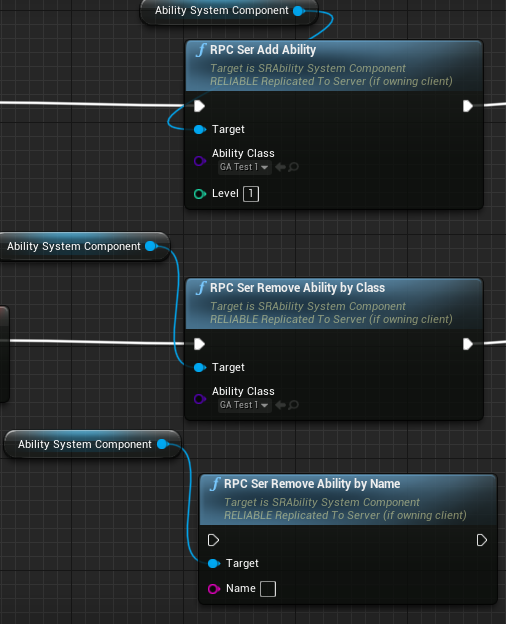
触发技能
如果是已经用之前按键绑定的技能, 那么按键就会直接触发技能
还有其他几个方法来手动触发技能
UFUNCTION(BlueprintCallable, Category = "Abilities")
bool TryActivateAbilitiesByTag(const FGameplayTagContainer& GameplayTagContainer, bool bAllowRemoteActivation = true);

UFUNCTION(BlueprintCallable, Category = "Abilities")
bool TryActivateAbilityByClass(`TSubclassOf<UGameplayAbility>` InAbilityToActivate, bool bAllowRemoteActivation = true);

bool TryActivateAbility(FGameplayAbilitySpecHandle AbilityToActivate, bool bAllowRemoteActivation = true);

bool TriggerAbilityFromGameplayEvent(FGameplayAbilitySpecHandle AbilityToTrigger, FGameplayAbilityActorInfo* ActorInfo, FGameplayTag Tag, const FGameplayEventData* Payload, UAbilitySystemComponent& Component);

FGameplayAbilitySpecHandle GiveAbilityAndActivateOnce(const FGameplayAbilitySpec& AbilitySpec);
到蓝图中就是如下
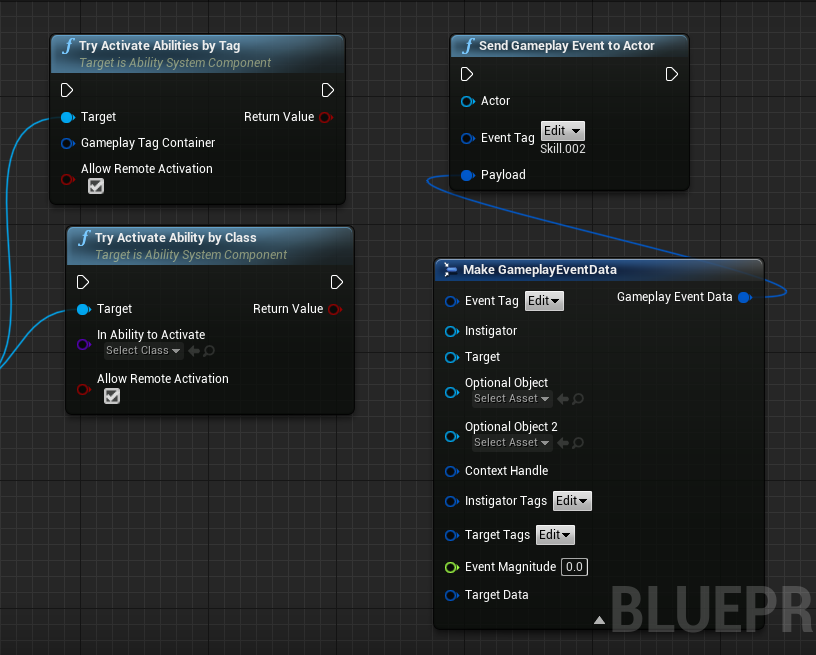
激活技能的不同方法决定GA中的函数调用, 一般都是执行到ActiveAbility,
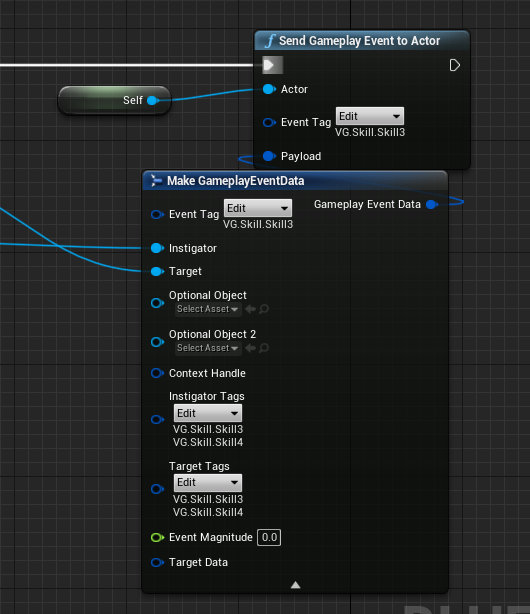
如果通过事件的方式触发技能, 即上述中的TriggerAbilityFromGameplayEvent或者蓝图中的SendGameplayEventToActor,那么可以提供一个Payload参数作为扩展参数,这个非常有用
那么在GA中可以重写函数ActivateAbilityFromEvent,前提是不要重写默认的ActivateAbility函数;
通过事件触发的方式还会与后续的tag有关系, 这个后续再讲
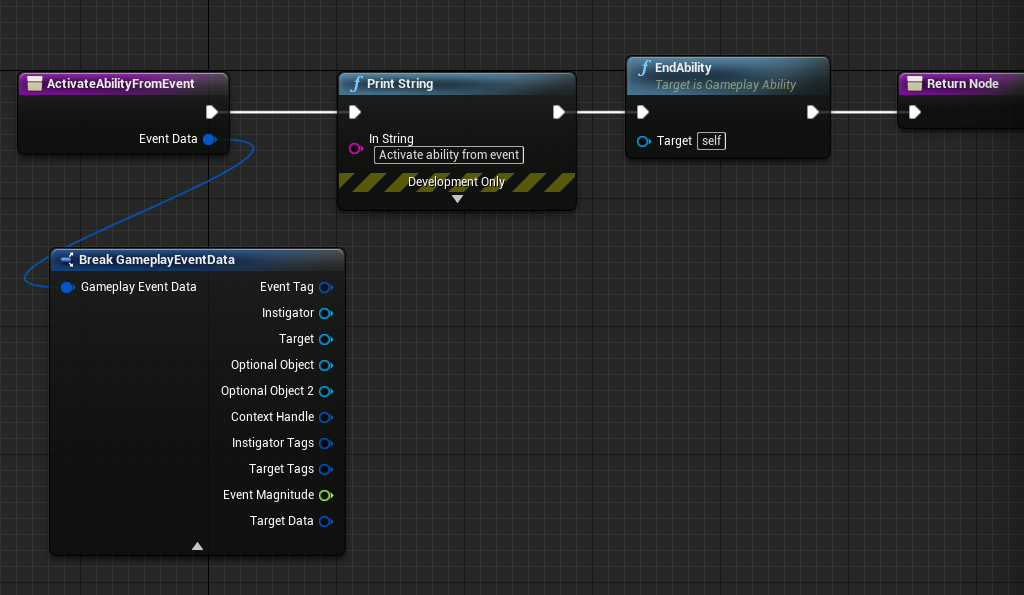
技能逻辑没有固定规则, 完全可以自己脑洞, 不过千万不要忘记在技能完成以后调用
EndAbility来结束技能,否则技能一直结束不了而类似一个被动技能一直存在
被动技能
被动技能如果是默认就存在(触发),可以在GA中的OnAvatarSet事件中最判断处理,如果有必要就直接调用TryActivateAbility(我们之前已经申明了一个布尔变量bAutoActive), 然后不要调用EndAbility就可以了
void UVGGameplayAbility::OnAvatarSet(const FGameplayAbilityActorInfo* ActorInfo, const FGameplayAbilitySpec& Spec)
{
	Super::OnAvatarSet(ActorInfo, Spec);
	if (bAutoActivate)//bool变量交给蓝图配置
	{
		ActorInfo->AbilitySystemComponent->TryActivateAbility(Spec.Handle, false);
	}
}
关闭/中断技能
目前在ASC中有如下几个方法关闭技能,都未暴露给蓝图;
void CancelAbility(UGameplayAbility* Ability);

void CancelAbilityHandle(const FGameplayAbilitySpecHandle& AbilityHandle);

void CancelAbilities(const FGameplayTagContainer* WithTags=nullptr, const FGameplayTagContainer* WithoutTags=nullptr, UGameplayAbility* Ignore=nullptr);

void CancelAllAbilities(UGameplayAbility* Ignore=nullptr);
在蓝图中只能在GA中自己调用CancelAbility关闭技能
不过我们可以自己封装蓝图函数库,如下
/*稍微注意一点,这里的FGameplayTagContainer参数我们使用引用而不是AbilityComponent::CancelAbilities函数中的指针,顺便来个AutoCreateRef都是方便蓝图使用*/
void UFlib_GAS::CancelAbilityWithTag(UAbilitySystemComponent* AbilityComponent, const FGameplayTagContainer& WithTags, const FGameplayTagContainer& WithoutTags, UGameplayAbility* Ignore)
{
	if (!AbilityComponent)
	{
		return;
	}
	AbilityComponent->CancelAbilities(&WithTags, &WithoutTags, Ignore);
}

void UFlib_GAS::CancelAllAbilities(UAbilitySystemComponent* AbilityComponent, UGameplayAbility* Ignore /*= nullptr*/)
{
	if (!AbilityComponent)
	{
		return;
	}
	AbilityComponent->CancelAllAbilities(Ignore);
}
//************************************
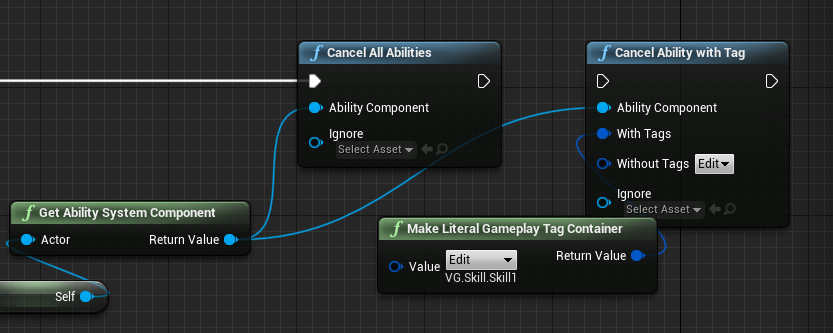
GASDocumentation项目文档说CancelAllAbilities有时候无法正常生效,但是我这边实测可以正常关闭技能
获取激活的技能
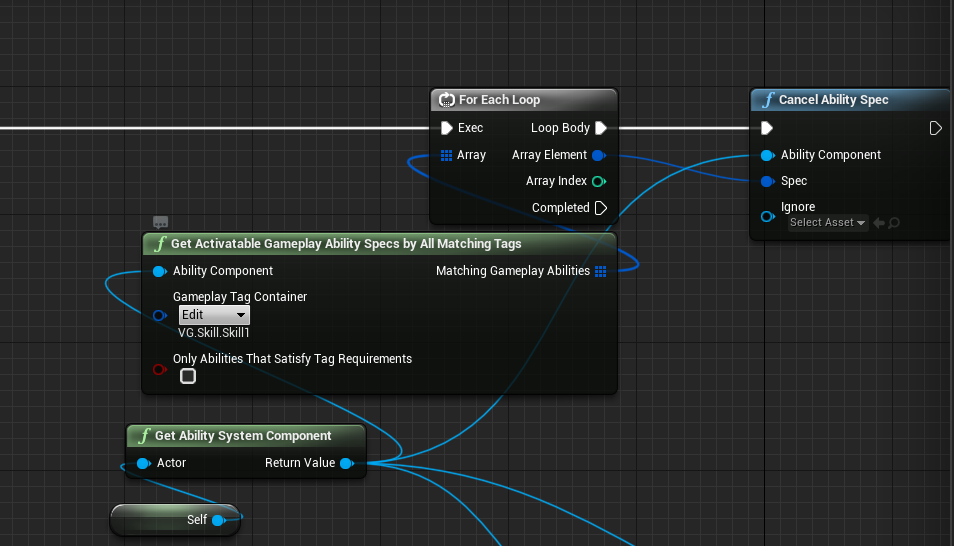
可以通过方法 void GetActivatableGameplayAbilitySpecsByAllMatchingTags(const FGameplayTagContainer& GameplayTagContainer, TArray < struct FGameplayAbilitySpec* >& MatchingGameplayAbilities, bool bOnlyAbilitiesThatSatisfyTagRequirements = true) const;根据tag获取正在运行的技能
照样可以封装一个蓝图函数库
//.h
UFUNCTION(BlueprintCallable, BlueprintPure, Category = "VGAS | FunctionLib", meta = (AutoCreateRefTerm = "GameplayTagContainer, WithTags"))
		static void GetActivatableGameplayAbilitySpecsByAllMatchingTags(UAbilitySystemComponent* AbilityComponent, const FGameplayTagContainer& GameplayTagContainer, TArray < struct FGameplayAbilitySpec >& MatchingGameplayAbilities, bool bOnlyAbilitiesThatSatisfyTagRequirements);
//.cpp
void UFlib_VGAS::GetActivatableGameplayAbilitySpecsByAllMatchingTags(UAbilitySystemComponent* AbilityComponent, const FGameplayTagContainer& GameplayTagContainer, TArray < struct FGameplayAbilitySpec >& MatchingGameplayAbilities, bool bOnlyAbilitiesThatSatisfyTagRequirements)
{

	if (!AbilityComponent)
	{
		return;
	}
	TArray <FGameplayAbilitySpec* > returnAbilities;

	AbilityComponent->GetActivatableGameplayAbilitySpecsByAllMatchingTags(GameplayTagContainer, returnAbilities, bOnlyAbilitiesThatSatisfyTagRequirements);
	for (FGameplayAbilitySpec* i : returnAbilities)
	{
		MatchingGameplayAbilities.Add(*i);
	}

}
这里还是因为蓝图的原因,传参不能按照原版本传参,需要一个临时变量
returnAbilities小小的加工一下
实例化模式
技能的实例化模式分为3种,见下表
Instancing Policy | Description | Example of when to use |
|---|---|---|
| Instanced Per Actor | 每个ASC只会生成一个实例,每次触发GA时服用实例对象 | 这个是最常用的方式 |
| Instanced Per Execution | 每次GA激活都会产生一个实例 | 这个方式不太常用,但是可以每个技能都独立作用 |
| Non-Instanced | GA自己默认Obj来维护自身,不会生成实例 | 这是三种方法中性能最好的,但是在使用的时候是最受限制的。非实例化的GameplayAbilities不能存储状态,这意味着没有动态变量,也没有绑定到AbilityTask委托。在MOBA或RTS中,最适合使用它们的是那些经常使用的简单技能,比如仆从基本攻击或者角色的Jump |
网络方案
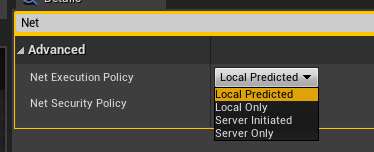
Net Execution Policy | Description |
|---|---|
Local Only | 只运行在本地客户端,这个比较适合在只表现本地效果的技能,单人游戏中需要使用Server Only |
Local Predicted | 先本地运行, 服务端会校准本地客户端错误的内容 |
Server Only | 只在服务端运行, 本地技能适合运行在服务端,单人游戏也适合用此 |
Server Initiated | 服务端先运行然后再运行在客户端,不常用 |
标签
GA的标签非常重要而且使用,包含如下标签
GameplayTag Container | Description |
|---|---|
Ability Tags | 当前技能拥有的标签, 也是通过tag来激活技能的凭证 |
Cancel Abilities with Tag | 当前技能会关闭的拥有此类tag的正在运行技能 |
Block Abilities with Tag | 运行技能的会阻挡拥有此类tag的技能(并不会返回失败) |
Activation Owned Tags | 此技能会激活的tag |
Activation Required Tags | 激活技能所需要包含的tag |
Activation Blocked Tags | 当拥有此类tag的技能正在运行时,该技能会被阻挡(并不会返回失败) |
Source Required Tags | 此标签包括如下共4个标签内,都是通过ByEvent的方式作用才有效; 此标签在输入的时候必须包含才能运行 |
Source Blocked Tags | 同理会被阻挡的标签 |
Target Required Tags | 同理目标必须包含的tag |
Target Blocked Tags | 同理目标如果包含会被阻挡的tag |
Gameplay Ability Spec
Gameplay Ability Spec在GA正确激活后会创建, 内部提供了诸多GA中的数据如 class,level,input bindings等
如果GA在服务端创建, 会同步到客户端
Gameplay Ability Spec创建实例规则请参考实例化模式 ↑
GA的传递数据
GA传递外部数据有如下几种方式
| Method | Description |
|---|---|
Activate GameplayAbility by Event | 通过此方法激活技能会有一个Payload参数, 可以用来传递诸多参数;如两个UObject参数更加方便扩展自定义数据 |
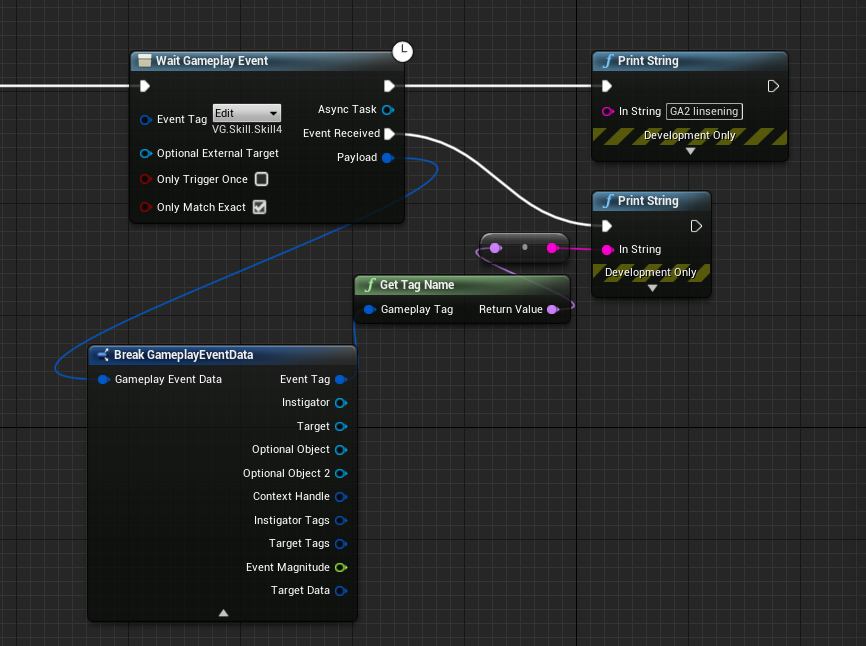
Use WaitGameplayEvent AbilityTask | 用这个方法可以监听其他tag技能的状态,以此类得到payload数据 |
Use TargetData | 用结构体 TargetData 传递数据是一个办法,具体以后补充 |
Store Data on the OwnerActor or AvatarActor | 把数据存到GA的OwnerActor或者角色中,但是你需要确保网络同步 |
技能消耗/冷却
技能的消耗和冷却通过GameplayEffect实现, 详情可以查看GameplayEffect篇
技能升级
| Level Up Method | Description |
|---|---|
| Ungrant and Regrant at the New Level | 移除GA,重新注册一个等级不一样的GA,此方式会终止GA |
Increase the GameplayAbilitySpec's Level | 对spec中的level进行升级处理,这种方式不会终止GA |
蓝图中无法得到GA中的Level变量, 所以无论是对GA的Level进行处理还是GE都需要在cpp中
void USRAbilitySystemComponent::UpgradeAbilityByName(const FString& name, int32 upLevel)
{
	if (AbilitySpecMap.Contains(name))
	{
		FGameplayAbilitySpec* spec = *AbilitySpecMap.Find(name);
		spec->Level += upLevel;
		this->MarkAbilitySpecDirty(*spec);
	}
}
因为添加的时候已经存放了TMap<FString, FGameplayAbilitySpec*> AbilitySpecMap, 直接对其进行操作即可, 按照GAS注释说明需要调用MarkAbilitySpecDirty()
网络规则
NetSecurityPolicy | Description |
|---|---|
ClientOrServer | 无要求,客户端和服务器都可以自由触发 |
ServerOnlyExecution | 客户端请求执行将被服务器忽略。客户端仍然可以请求服务器取消或终止此功能。 |
ServerOnlyTermination | 客户端可以请求执行, 但是不能请求终止或者取消 |
ServerOnly | 只有服务端有权执行,客户端无法执行任何操作 |