- Published on
- |- 次浏览
GameplayAbilitySystem入门与实战(三):几个有用的异步事件
- Authors

- Name
- 东哥
前言
这一篇单独创建几个非常有用的异步节点,如UAsyncTask_ListenAttributeChanged可以实时监听任意属性的更改情况,在初期我们用于临时UMG中,方便我们查询和debug;
可以使用继承自UBlueprintAsyncActionBase的基本异步类, 也可以使用GAS框架内的UAbilityTask来制作
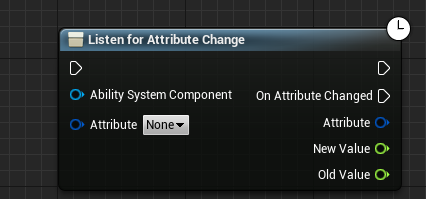
异步事件:属性监听
这个节点相对比较简单, 原理就是通过ASC中的GetGameplayAttributeValueChangeDelegate()绑定对应属性的代理,然后简单的派发异步节点中的代理, 这是GASD项目采用的方案,
- 头文件
DECLARE_DYNAMIC_MULTICAST_DELEGATE_ThreeParams(FOnAttributeChanged, FGameplayAttribute, Attribute, float, NewValue, float, OldValue);

UCLASS()
class SUPERROAD_API UAsyncTask_ListenAttributeChanged : public UBlueprintAsyncActionBase
{
	GENERATED_BODY()
public:
	UPROPERTY(BlueprintAssignable)
		FOnAttributeChanged OnAttributeChanged;

	// 监听attribute 改变
	UFUNCTION(BlueprintCallable, meta = (BlueprintInternalUseOnly = "true"))
		static UAsyncTask_ListenAttributeChanged* ListenForAttributeChange(UAbilitySystemComponent* AbilitySystemComponent, FGameplayAttribute Attribute);

	// 数组版本
	UFUNCTION(BlueprintCallable, meta = (BlueprintInternalUseOnly = "true"))
		static UAsyncTask_ListenAttributeChanged* ListenForAttributesChange(UAbilitySystemComponent* AbilitySystemComponent, `TArray<FGameplayAttribute>` Attributes);

	UFUNCTION(BlueprintCallable)
		void EndTask();

protected:
	UPROPERTY()
		UAbilitySystemComponent* ASC;

	FGameplayAttribute AttributeToListenFor;
	`TArray<FGameplayAttribute>` AttributesToListenFor;

	void AttributeChanged(const FOnAttributeChangeData& Data);
};
没什么特殊需要注意的, 提供了2个版本的监听
- cpp
UAsyncTask_ListenAttributeChanged* UAsyncTask_ListenAttributeChanged::ListenForAttributeChange(UAbilitySystemComponent* AbilitySystemComponent, FGameplayAttribute Attribute)
{
	UAsyncTask_ListenAttributeChanged* WaitForAttributeChangedTask = `NewObject<UAsyncTask_ListenAttributeChanged>`();
	WaitForAttributeChangedTask->ASC = AbilitySystemComponent;
	WaitForAttributeChangedTask->AttributeToListenFor = Attribute;

	if (!IsValid(AbilitySystemComponent) || !Attribute.IsValid())
	{
		WaitForAttributeChangedTask->RemoveFromRoot();
		return nullptr;
	}

	AbilitySystemComponent->GetGameplayAttributeValueChangeDelegate(Attribute).AddUObject(WaitForAttributeChangedTask, &UAsyncTask_ListenAttributeChanged::AttributeChanged);

	return WaitForAttributeChangedTask;
}
构造一个异步节点类, 赋值,绑定ASC事件
UAsyncTask_ListenAttributeChanged* UAsyncTask_ListenAttributeChanged::ListenForAttributesChange(UAbilitySystemComponent* AbilitySystemComponent, `TArray<FGameplayAttribute>` Attributes)
{
	UAsyncTask_ListenAttributeChanged* WaitForAttributeChangedTask = `NewObject<UAsyncTask_ListenAttributeChanged>`();
	WaitForAttributeChangedTask->ASC = AbilitySystemComponent;
	WaitForAttributeChangedTask->AttributesToListenFor = Attributes;

	if (!IsValid(AbilitySystemComponent) || Attributes.Num() < 1)
	{
		WaitForAttributeChangedTask->RemoveFromRoot();
		return nullptr;
	}

	for (FGameplayAttribute Attribute : Attributes)
	{
		AbilitySystemComponent->GetGameplayAttributeValueChangeDelegate(Attribute).AddUObject(WaitForAttributeChangedTask, &UAsyncTask_ListenAttributeChanged::AttributeChanged);
	}

	return WaitForAttributeChangedTask;
}
数组版本,区别不大
void UAsyncTask_ListenAttributeChanged::EndTask()
{
	if (IsValid(ASC))
	{
		ASC->GetGameplayAttributeValueChangeDelegate(AttributeToListenFor).RemoveAll(this);

		for (FGameplayAttribute Attribute : AttributesToListenFor)
		{
			ASC->GetGameplayAttributeValueChangeDelegate(Attribute).RemoveAll(this);
		}
	}

	SetReadyToDestroy();
	MarkPendingKill();
}
EndTask事件不能忘记执行,否则可能会导致引擎崩溃
在这里就是解除绑定
void UAsyncTask_ListenAttributeChanged::AttributeChanged(const FOnAttributeChangeData& Data)
{
	OnAttributeChanged.Broadcast(Data.Attribute, Data.NewValue, Data.OldValue);
}
转发,派发代理
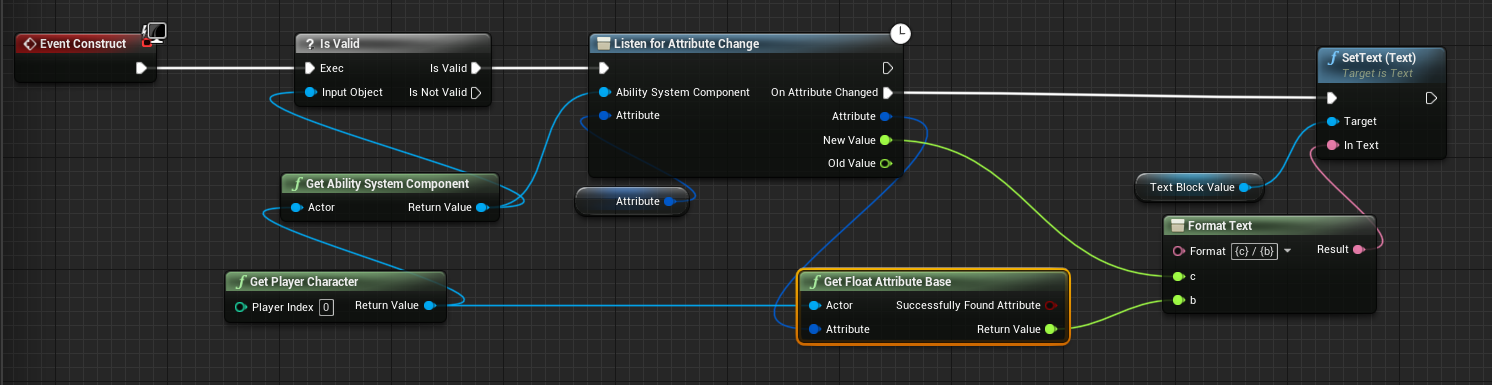
这里创建了一个UMG控件通过公开的属性变量来监听特定的属性
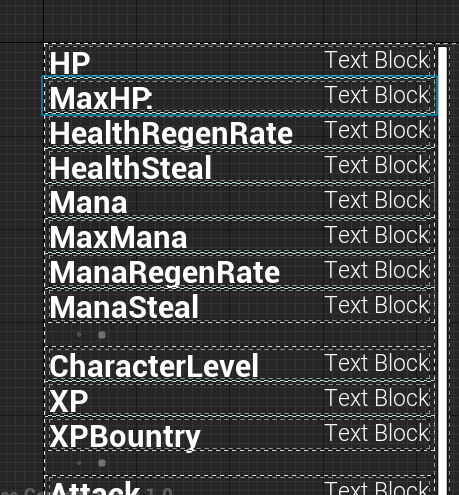
然后就放到一个DebugUI中,监听所有属性
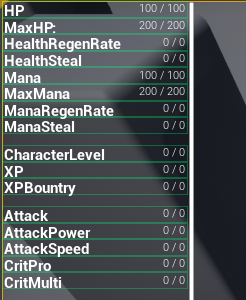
这是运行以后的
如果你想要自己定义一套属性响应机制也可以通过比如在AttributeSet内广播代理事件来达到同样的目的, 我们模仿ASC的那一套来实现一下
DECLARE_MULTICAST_DELEGATE_ThreeParams(FOnAttributeChangedMulDly, const FGameplayAttribute&,float,float);
public:
	FOnAttributeChangedMulDly& GetGameplayAttributeValueChangeDelegate(FGameplayAttribute Attribute);
protected:
	void BroadcastValueChanged(FGameplayAttribute Attribute);
	TMap<FGameplayAttribute, FOnAttributeChangedMulDly> AttributeValueChangeDelegates;
然后异步事件节点通过类似的方式绑定就可以了, 我们这里输出的是Current和Base值, 与前面方案有所不同
异步事件:冷却
冷却时间比前面的属性略微复杂一点点, 监听了两个时间,开始和结束,并没有中间过程, 查看ASC以及GE和GA的代码发现并无相关的事件代理, 但是可以有方法找到当前技能或者GE的RemainingTime和Duration.
无妨, 这个或许是因为消耗问题, 没有必要一直派发代理来告诉我们CD刷新了, 我们做测试或者到时候UI显示的转圈圈效果也只需要做个本地的效果就可以了
- 头文件
DECLARE_DYNAMIC_MULTICAST_DELEGATE_ThreeParams(FOnCooldownChanged, FGameplayTag, CooldownTag, float, TimeRemaining, float, Duration);

UPROPERTY(BlueprintAssignable)
		FOnCooldownChanged OnCooldownBegin;
	UPROPERTY(BlueprintAssignable)
		FOnCooldownChanged OnCooldownEnd;
类似的创建静态事件返回自己
	UFUNCTION(BlueprintCallable, meta = (BlueprintInternalUseOnly = "true"))
		static UAsyncTask_ListenCooldownUpdated* ListenForCooldownChange(UAbilitySystemComponent* AbilitySystemComponent, FGameplayTagContainer InCooldownTags, bool InUseServerCooldown);
几个Protected
protected:
	UPROPERTY()
		UAbilitySystemComponent* ASC;
	FGameplayTagContainer CooldownTags;
	bool UseServerCooldown;
	virtual void OnActiveGameplayEffectAddedCallback(UAbilitySystemComponent* Target, const FGameplayEffectSpec& SpecApplied, FActiveGameplayEffectHandle ActiveHandle);
	virtual void CooldownTagChanged(const FGameplayTag CooldownTag, int32 NewCount);
	bool GetCooldownRemainingForTag(FGameplayTagContainer InCooldownTags, float& TimeRemaining, float& CooldownDuration)
cpp
先看激活GE的回调事件
先从Spec中拿到需要的tag,查询我们指定的冷却tag是否包含在里面
如果存在, 那么拿到所需要的时间根据相关设置广播
void UAsyncTask_ListenCooldownUpdated::OnActiveGameplayEffectAddedCallback(UAbilitySystemComponent* Target, const FGameplayEffectSpec& SpecApplied, FActiveGameplayEffectHandle ActiveHandle)
{
FGameplayTagContainer AssetTags;
	SpecApplied.GetAllAssetTags(AssetTags);

	FGameplayTagContainer GrantedTags;
	SpecApplied.GetAllGrantedTags(GrantedTags);

	`TArray<FGameplayTag>` CooldownTagArray;
	CooldownTags.GetGameplayTagArray(CooldownTagArray);

	for (FGameplayTag CooldownTag : CooldownTagArray)
	{
		if (AssetTags.HasTagExact(CooldownTag) || GrantedTags.HasTagExact(CooldownTag))
		{
			float TimeRemaining = 0.0f;
			float Duration = 0.0f;

			FGameplayTagContainer CooldownTagContainer(GrantedTags.GetByIndex(0));
			GetCooldownRemainingForTag(CooldownTagContainer, TimeRemaining, Duration);

			if (ASC->GetOwnerRole() == ROLE_Authority)
			{
				// 服务端玩家
				OnCooldownBegin.Broadcast(CooldownTag, TimeRemaining, Duration);
			}
			else if (!UseServerCooldown && SpecApplied.GetContext().GetAbilityInstance_NotReplicated())
			{
				// 客户端使用预测冷却时间
				OnCooldownBegin.Broadcast(CooldownTag, TimeRemaining, Duration);
			}
			else if (UseServerCooldown && SpecApplied.GetContext().GetAbilityInstance_NotReplicated() == nullptr)
			{
				// 客户端使用服务端冷却
				OnCooldownBegin.Broadcast(CooldownTag, TimeRemaining, Duration);
			}
			else if (UseServerCooldown && SpecApplied.GetContext().GetAbilityInstance_NotReplicated())
			{
				//客户端使用服务器的冷却时间,但这是GE预测的冷却时间。
				//在服务器冷却时间到来之前,这可以使技能变灰。
				OnCooldownBegin.Broadcast(CooldownTag, -1.0f, -1.0f);
			}
		}
	}
}
通过tag找到所需的时间, 这两个时间是保存在GE中的, 也可以通过ASC去查询得到.
下面方法是从数组中找到值最大的作为返回值
bool UAsyncTask_ListenCooldownUpdated::GetCooldownRemainingForTag(FGameplayTagContainer InCooldownTags, float& TimeRemaining, float& CooldownDuration)
{
	if (IsValid(ASC) && InCooldownTags.Num() > 0)
	{
		TimeRemaining = 0.f;
		CooldownDuration = 0.f;

		FGameplayEffectQuery const Query = FGameplayEffectQuery::MakeQuery_MatchAnyOwningTags(InCooldownTags);
		TArray< TPair<float, float> > DurationAndTimeRemaining = ASC->GetActiveEffectsTimeRemainingAndDuration(Query);
		if (DurationAndTimeRemaining.Num() > 0)
		{
			int32 BestIdx = 0;
			float LongestTime = DurationAndTimeRemaining[0].Key;
			for (int32 Idx = 1; Idx < DurationAndTimeRemaining.Num(); ++Idx)
			{
				if (DurationAndTimeRemaining[Idx].Key > LongestTime)
				{
					LongestTime = DurationAndTimeRemaining[Idx].Key;
					BestIdx = Idx;
				}
			}

			TimeRemaining = DurationAndTimeRemaining[BestIdx].Key;
			CooldownDuration = DurationAndTimeRemaining[BestIdx].Value;

			return true;
		}
	}

	return false;
}
下面再看静态方法, 这个也没什么大的难点, 绑定了GE激活的代理, 然后根据tag注册tag对应的事件
UAsyncTask_ListenCooldownUpdated* UAsyncTask_ListenCooldownUpdated::ListenForCooldownChange(UAbilitySystemComponent* AbilitySystemComponent, FGameplayTagContainer InCooldownTags, bool InUseServerCooldown)
{
	UAsyncTask_ListenCooldownUpdated* task = `NewObject<UAsyncTask_ListenCooldownUpdated>`();
	task->ASC = AbilitySystemComponent;
	task->CooldownTags = InCooldownTags;
	task->UseServerCooldown = InUseServerCooldown;

	if (!IsValid(AbilitySystemComponent) || InCooldownTags.Num() < 1)
	{
		task->EndTask();
		return nullptr;
	}

	AbilitySystemComponent->OnActiveGameplayEffectAddedDelegateToSelf.AddUObject(task, &UAsyncTask_ListenCooldownUpdated::OnActiveGameplayEffectAddedCallback);

	`TArray<FGameplayTag>` CooldownTagArray;
	InCooldownTags.GetGameplayTagArray(CooldownTagArray);

	for (FGameplayTag CooldownTag : CooldownTagArray)
	{
		AbilitySystemComponent->RegisterGameplayTagEvent(CooldownTag, EGameplayTagEventType::NewOrRemoved).AddUObject(task, &UAsyncTask_ListenCooldownUpdated::CooldownTagChanged);
	}

	return task;
}
结束事件
void UAsyncTask_ListenCooldownUpdated::EndTask()
{
	if (IsValid(ASC))
	{
		ASC->OnActiveGameplayEffectAddedDelegateToSelf.RemoveAll(this);

		`TArray<FGameplayTag>` CooldownTagArray;
		CooldownTags.GetGameplayTagArray(CooldownTagArray);

		for (FGameplayTag CooldownTag : CooldownTagArray)
		{
			ASC->RegisterGameplayTagEvent(CooldownTag, EGameplayTagEventType::NewOrRemoved).RemoveAll(this);
		}
	}

	SetReadyToDestroy();
	MarkPendingKill();
}
最后是tag改变的事件
void UAsyncTask_ListenCooldownUpdated::CooldownTagChanged(const FGameplayTag CooldownTag, int32 NewCount)
{
	if (NewCount == 0)
	{
		OnCooldownEnd.Broadcast(CooldownTag, -1.0f, -1.0f);
	}
}
异步事件:GE层数
这个节点用于监听可以叠加的GE的层数
- 头文件
DECLARE_DYNAMIC_MULTICAST_DELEGATE_FourParams(FOnGameplayEffectStackChanged, FGameplayTag, EffectGameplayTag, FActiveGameplayEffectHandle, Handle, int32, NewStackCount, int32, OldStackCount);

UCLASS()
class SUPERROAD_API UAsyncTask_ListenGEStackChanged : public UBlueprintAsyncActionBase
{
	GENERATED_BODY()


		UPROPERTY(BlueprintAssignable)
		FOnGameplayEffectStackChanged OnGameplayEffectStackChange;

	UFUNCTION(BlueprintCallable, meta = (BlueprintInternalUseOnly = "true"))
		static UAsyncTask_ListenGEStackChanged* ListenForGameplayEffectStackChange(UAbilitySystemComponent* AbilitySystemComponent, FGameplayTag InEffectGameplayTag);

	UFUNCTION(BlueprintCallable)
		void EndTask();

protected:
	UPROPERTY()
		UAbilitySystemComponent* ASC;

	FGameplayTag EffectGameplayTag;

	virtual void OnActiveGameplayEffectAddedCallback(UAbilitySystemComponent* Target, const FGameplayEffectSpec& SpecApplied, FActiveGameplayEffectHandle ActiveHandle);
	virtual void OnRemoveGameplayEffectCallback(const FActiveGameplayEffect& EffectRemoved);

	virtual void GameplayEffectStackChanged(FActiveGameplayEffectHandle EffectHandle, int32 NewStackCount, int32 PreviousStackCount);
};
头文件跟之前的区别不大, 三个本地事件分别用于绑定 激活/移除GE和层数变化
cpp
静态函数绑定了2个代理
OnActiveGameplayEffectAddedDelegateToSelf和OnAnyGameplayEffectRemovedDelegate
UAsyncTask_ListenGEStackChanged* UAsyncTask_ListenGEStackChanged::ListenForGameplayEffectStackChange(UAbilitySystemComponent* AbilitySystemComponent, FGameplayTag InEffectGameplayTag)
{

	UAsyncTask_ListenGEStackChanged* task = `NewObject<UAsyncTask_ListenGEStackChanged>`();
	task->ASC = AbilitySystemComponent;
	task->EffectGameplayTag = InEffectGameplayTag;

	if (!IsValid(AbilitySystemComponent) || !InEffectGameplayTag.IsValid())
	{
		task->EndTask();
		return nullptr;
	}

	AbilitySystemComponent->OnActiveGameplayEffectAddedDelegateToSelf.AddUObject(task, &UAsyncTask_ListenGEStackChanged::OnActiveGameplayEffectAddedCallback);
	AbilitySystemComponent->OnAnyGameplayEffectRemovedDelegate().AddUObject(task, &UAsyncTask_ListenGEStackChanged::OnRemoveGameplayEffectCallback);

	return task;
}
然后结束任务的时候接触绑定
void UAsyncTask_ListenGEStackChanged::EndTask()
{
	if (IsValid(ASC))
	{
		ASC->OnActiveGameplayEffectAddedDelegateToSelf.RemoveAll(this);
		ASC->OnAnyGameplayEffectRemovedDelegate().RemoveAll(this);
	}

	SetReadyToDestroy();
	MarkPendingKill();
}
激活GE的时候做了一个tag判断,如果复合就绑定OnGameplayEffectStackChangeDelegate并且广播代理
同理在移除的时候也广播
void UAsyncTask_ListenGEStackChanged::OnActiveGameplayEffectAddedCallback(UAbilitySystemComponent* Target, const FGameplayEffectSpec& SpecApplied, FActiveGameplayEffectHandle ActiveHandle)
{
	FGameplayTagContainer AssetTags;
	SpecApplied.GetAllAssetTags(AssetTags);

	FGameplayTagContainer GrantedTags;
	SpecApplied.GetAllGrantedTags(GrantedTags);

	if (AssetTags.HasTagExact(EffectGameplayTag) || GrantedTags.HasTagExact(EffectGameplayTag))
	{
		ASC->OnGameplayEffectStackChangeDelegate(ActiveHandle)->AddUObject(this, &UAsyncTask_ListenGEStackChanged::GameplayEffectStackChanged);
		OnGameplayEffectStackChange.Broadcast(EffectGameplayTag, ActiveHandle, 1, 0);
	}
}

void UAsyncTask_ListenGEStackChanged::OnRemoveGameplayEffectCallback(const FActiveGameplayEffect& EffectRemoved)
{
	FGameplayTagContainer AssetTags;
	EffectRemoved.Spec.GetAllAssetTags(AssetTags);

	FGameplayTagContainer GrantedTags;
	EffectRemoved.Spec.GetAllGrantedTags(GrantedTags);

	if (AssetTags.HasTagExact(EffectGameplayTag) || GrantedTags.HasTagExact(EffectGameplayTag))
	{
		OnGameplayEffectStackChange.Broadcast(EffectGameplayTag, EffectRemoved.Handle, 0, 1);
	}
}

void UAsyncTask_ListenGEStackChanged::GameplayEffectStackChanged(FActiveGameplayEffectHandle EffectHandle, int32 NewStackCount, int32 PreviousStackCount)
{
	OnGameplayEffectStackChange.Broadcast(EffectGameplayTag, EffectHandle, NewStackCount, PreviousStackCount);
}